
iPhone Screenshots

Description
No need to touch the mouse — everything at your fingertips!
Quickly move, click, and drag the mouse cursor using just your keyboard. Boost your efficiency and stay focused.
◈ Features ◈
————————————
■ Keyboard-driven cursor control: Instantly move and position the mouse pointer using keyboard shortcuts.
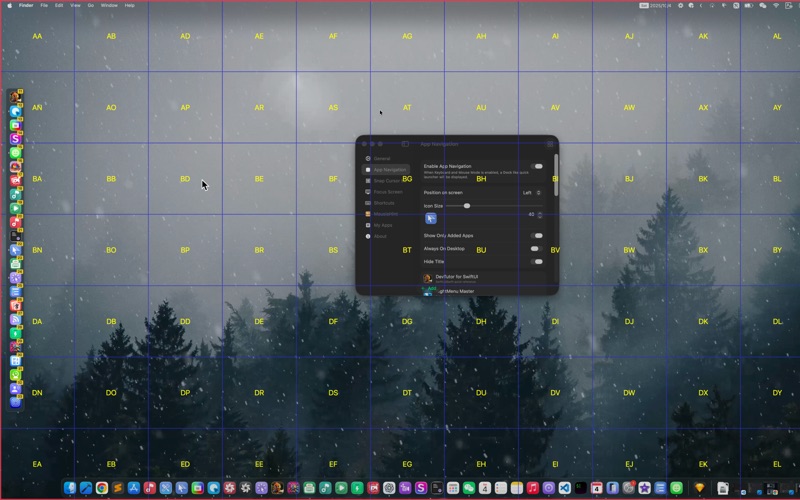
■ Grid navigation mode: Navigate precisely using a resizable on-screen grid.
■ Multi-display support: Seamlessly move the cursor across multiple monitors.
■ Custom Dock-style launcher: Create a customizable Dock-style panel for quick app or action access.
■ Focus Screen: Highlight the screen under the mouse cursor to focus on the active area.
■ Hint settings support: Use shortcuts to quickly locate UI elements and move the pointer
◈ Shortcuts ◈
————————————
■ Enable keyboard and mouse mode: 【Ctrl ⌃】 / 【Cmd ⌘】 / 【Opt ⌥】 double tap
■ Exit keyboard and mouse mode: 【ESC】
■ Arrow key layouts:
【A ←】 【S ↓】 【W ↑】 【D →】WASD
【H ←】 【J ↓】 【K ↑】 【L →】HJKL
【J ←】 【K ↓】 【I ↑】 【L →】JKIL
【S ←】 【D ↓】【E ↑】【F →】ESDF
【▼↓】 【▲↑】【▶→】【◀ ←】
■ Enable grid navigation mode: 【C】
■ Reset grid navigation search: 【Delete ⌫】
■ Hold 【Space】 and use 【A】 【S】 【W】 【D】 to move windows, select text, and move files
■ Left mouse click: 【;:】or 【retern】
■ Right mouse click: 【'"】
■ Mouse wheel scroll(Customizable):
Scroll left: 【U】
Scroll right: 【O】
Scroll down: 【N】
Scroll up: 【M】
◈ Policies & Terms ◈
————————————
For privacy policy, visit: https://wangchujiang.com/mousio/privacy-policy.zh.html
For terms of service, visit: https://wangchujiang.com/mousio/terms-of-service.zh.html
◈ Contact Me ◈
————————————
If you have any questions or concerns, please contact us at: [email protected]