
iPhone Screenshots



Description
Deskeen 2: Screenshot. Elevated!
Basic Capture & Special modes
- Capture Area, Previous Area, Window, Fullscreen, and Timer modes
- Quick access to all features via keyboard shortcuts
- Freeform Mode (Capture Area only): Free area selection with Control + Drag for instant screen pin, Space for window capture
- Precision Mode (Capture Area only): Pixel-perfect control with arrow keys (1-pixel) and Shift + arrows (10-pixel)
- Instant Screen Pin without creating files (Freeform & Precision modes)
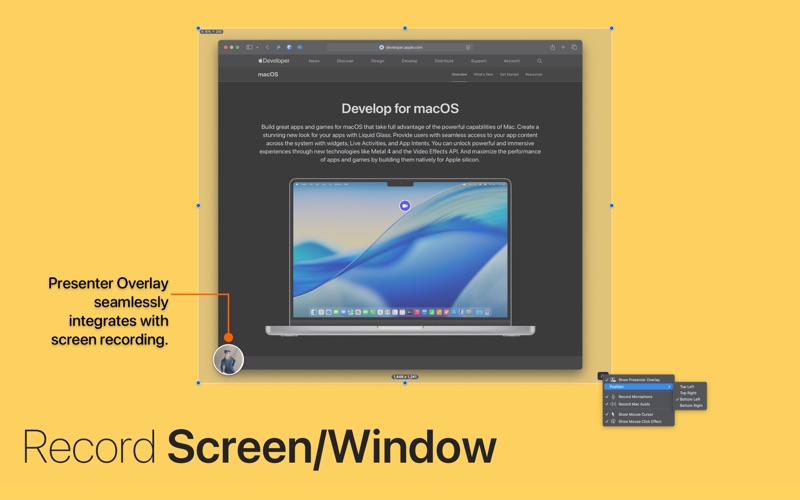
Screen/Window Recording
- Precise recording of windows or custom areas with H.264/HEVC encoding
- Frame rates from 15 to 60 FPS, audio in AAC/ALAC/FLAC formats
- All Mac system audio and microphone recording included
- Export to Animated GIF or Audio file
- Presenter Overlay with connected camera and customizable positioning
- Supports cursor display and click effects
OCR, Barcode, QR Code
- Support for 24 languages: Chinese, Czech, Danish, Dutch, English, French, German, Italian, Japanese, Korean, Norwegian, Polish, Portuguese, Romanian, Russian, Spanish, Swedish, Turkish, Ukrainian and more
- Barcode & QR code recognition
- Automatic clipboard copying of recognized content
- Automatic saving of original capture images
Capture Color
- Records color extraction location
- Three picker sizes and six zoom levels
- Size adjustment via mouse wheel/trackpad
- Color conversion to 22 formats (Web, macOS, iOS, .Net and more)
- Automatic saving of original capture images
Capture Preview
- Preview with Screen Pin, Annotate
- Clipboard copying, file saving, and Drag & Drop
- Tag addition and export to HEIC, Animated GIF, or Audio file
- Position settings on either edge of display
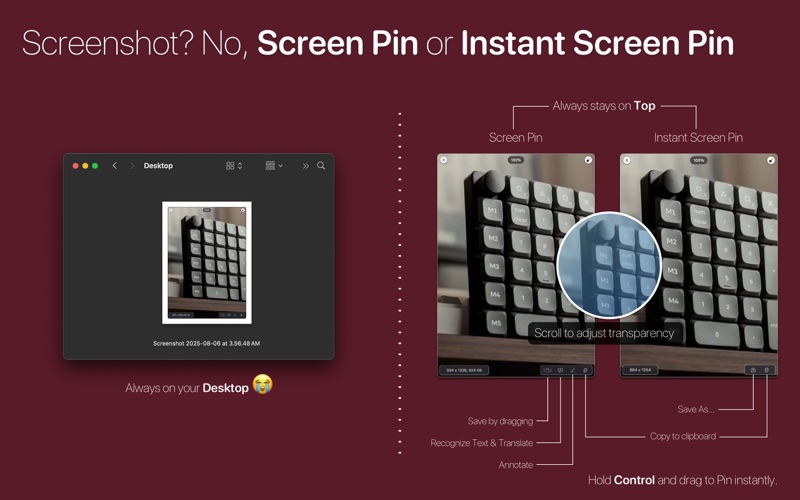
Screen Pin!
- Pin screenshots to captured location with automatic position restoration
- Transparency adjustment and position locking
- Drag-and-drop saving and clipboard copying
- Text recognition, translation, and Apple Intelligence support (macOS 15.3+)
Instant Screen Pin
- Captures content without creating files, perfect for temporary viewing
- Save decision can be made after previewing the result
- Freeform Mode: Control + Drag to activate
- Precision Mode: One-click activation via Instant Screen Pin icon in Area Selection UI
- Eliminates traditional capture-file generation-viewing cycle
Annotation Tools
- Redact mode: pixel and blur effects with 10 colors, 3 checkerboard patterns
- Counter tool: drag-to-resize with 13 colors, 9 font types, custom color support
- Integrated with macOS Markup for image editing: text, drawing, shapes, rotate, and crop
- Real-time iPhone/iPad integration
- Simple original image restoration
- Drag-and-drop saving, sharing, and clipboard copy
- Text recognition, translation, and Apple Intelligence support (macOS 15.3+)
Screen Annotation
- Direct annotation on any Mac screen content with pen, lines, shapes, and text
- Perfect for presentations, online teaching, video lectures, and screen sharing
- Live capture and screen recording support during annotation
- Automatic identification in Capture History as Screen Annotation captures
- Real-time visual communication tool for enhanced collaboration
Scrolling Capture
- Captures entire long web pages or documents in a single image
- Comprehensive downward-scrolling content capture (requires slow scrolling for accuracy)
- Large-scale capture support up to 20,000 pixels maximum
- Special icon identification in Capture History for easy distinction
Page Capture
- Automatic continuous capture for multi-screen content like slides and web pages
- Simple setup: specify app, set navigation keys, define count and timing
- Perfect for HTML slides, Keynote, YouTube summaries, and multi-screen apps
- Supports horizontal slides and vertical scrolling automatically
- Multiple outputs: images, Animated GIF, PDF
- Custom folder naming and adjustable intervals with YouTube mode
and Capture History, Tags, iCloud Sync, Widget, Desktop Icon Hider, Menubar customization!
Compatibility: macOS 14.6 or higher