
iPhone Screenshots
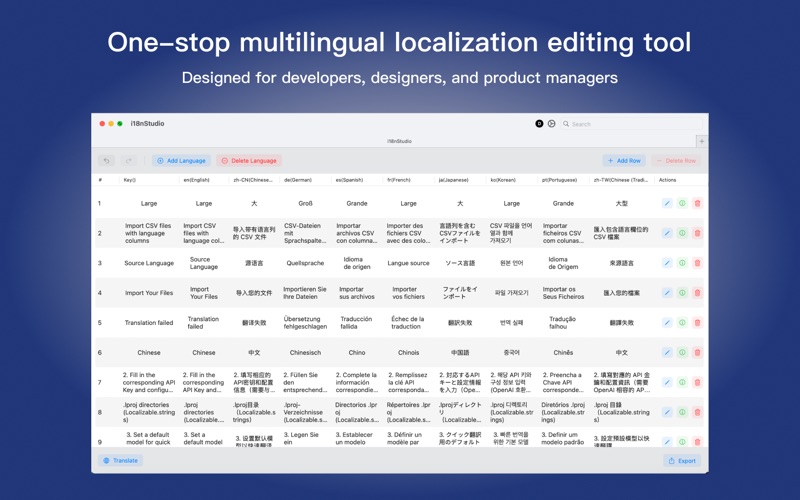


Description
i18nStudio is a powerful internationalization tool designed for developers. It supports localization file workflows and AI-powered translation for iOS, Android, and Web applications. Whether you are a mobile developer, web developer, or product manager, i18nStudio helps you efficiently manage and translate multilingual content.
Core Features
Multi-platform format support
- iOS: Full support for the .lproj directory structure and Localizable.strings, plus Xcode 15+ XCStrings format
- Android: Supports the values directory structure and strings.xml
- Flutter: Supports the .arb format to easily manage and edit Flutter localization resources
- Web: Supports multiple JSON formats, including flat and nested structures
- General: Supports CSV spreadsheets, fully compatible with Excel
AI translation engine
- Supports major LLM API services such as DeepSeek and Kimi
- Batch translation with automatic progress tracking and status display
- Intelligent language detection for both source and target languages
- Translation quality control with result review and rollback
Modern user interface
- Native macOS app built with SwiftUI
- Supports Dark Mode and Dynamic Type
- Intuitive drag-and-drop file import
- Real-time search and filtering
- Full undo/redo system
Primary Use Cases
Mobile app developers
- iOS developers: Import .lproj directories, edit translation content, and export to XCStrings or continue using the .lproj format
- Android developers: Import the values directory, perform batch translation, and export in the standard Android resource format
- Flutter developers: Import .arb files to easily manage and edit localization resources, support batch translation, and export to standardized formats
Web developers
- Supports various web frameworks such as React i18next and Vue I18n
- Handle complex JSON localization file structures
- Generate translation files that meet framework requirements
Product managers and translators
- Edit CSV files using the familiar Excel format
- Manage multilingual content in bulk
- View translation progress and completion in real time
Technical Capabilities
Intelligent file handling
- Automatically detect file formats and encodings
- Robust error tolerance that skips invalid entries
- Automatic file backups to ensure data safety
Advanced editing features
- Real-time editing; double-click cells to modify directly
- Bulk actions; select multiple rows for batch editing
- Full-text search with support for regular expressions and fuzzy matching
- Analytics to display translation progress and language coverage
Why choose i18nStudio
Professional-grade features
- A professional tool designed specifically for developers
- Supports localization formats for all major platforms
- Powerful AI translation integrations
Efficient and easy to use
- Intuitive user interface with minimal learning curve
- Drag-and-drop operations that simplify file import
- Batch processing that significantly boosts productivity
Secure and reliable
- Local processing to protect your translation data
Continuous updates
- Regular feature updates and performance optimizations
- Timely support for new file formats and translation services
Get Started
1. Import files: Drag your localization files into the app window
2. Edit content: Use the intuitive interface to edit translation content
3. AI translation: Configure a translation service and perform batch translation with one click
4. Export files: Choose the target format and export standardized localization files
i18nStudio makes internationalization development simple and efficient—your trusted companion for building multilingual apps.