
iPhone Screenshots


Description
Ever troubled by heaps of messy filenames on your computer? Spending lots of time manually organizing photos, documents, music, or project files? ZenRename is the macOS solution you need. It's a powerful and intuitive batch file renaming tool designed to help you efficiently and conveniently manage and organize files, saving valuable time.
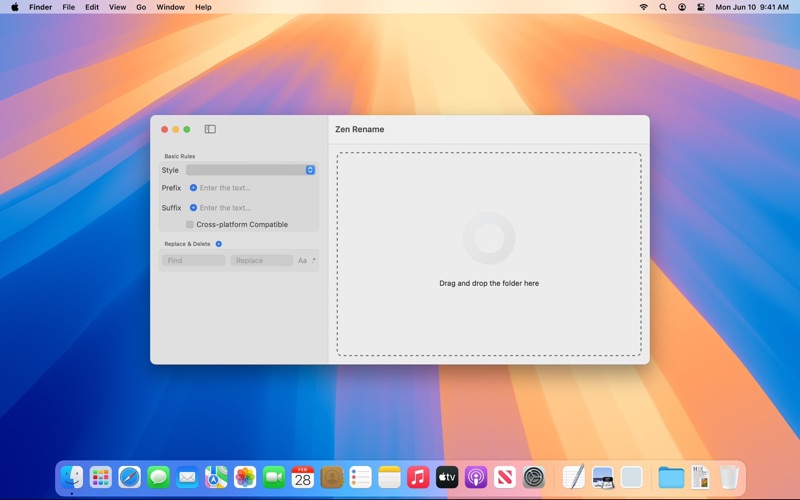
With ZenRename's clean interface and powerful features, you can easily handle all kinds of complex file naming tasks.
Key Features:
1. Efficient Batch Renaming:
- Easy Adding: Supports intuitive drag-and-drop operations to quickly add single or multiple files/folders.
- List Sorting Control: After adding files, you can manually adjust their order in the list. Automatic sorting by various methods like filename, modification date, etc., is also supported, ensuring rules like sequence numbers are applied in your desired order.
- Smart Extension Protection: By default, all renaming operations only target the filename base. Your file extensions (like `.txt`, `.jpg`, `.pdf`, etc.) will be automatically recognized and fully preserved, ensuring file types and associated applications remain unaffected.
- Real-time Preview: Before executing the rename, instantly see how each filename (excluding the extension) will change, ensuring the results meet expectations and preventing errors.
- One-click Execution: Once the rules are configured, simply click once to complete the renaming operation for all files.
2. Powerful and Flexible Rule Configuration:
- Replace & Delete: Utilize the powerful Regular Expression (Regex) engine to find and replace or delete extremely complex text patterns within the filename base, enabling precise text manipulation.
- Add Prefix & Suffix: Easily add custom text to the beginning or end of the filename base. Supports inserting dynamic variables, such as:
- Creation/Modification Date
- Incrementing/Decrementing Sequence Numbers (supports numeric, alphabetic, Roman numeral formats)
- Parent Folder Name, etc.
- Naming Style Conversion: Convert filename bases to various standard or custom naming styles with a single click, while keeping extensions unchanged. Ideal for developers, designers, and content creators. Supported styles include:
- lowercase (example.txt)
- UPPERCASE (EXAMPLE.txt)
- Capitalized (Example.txt)
- camelCase (exampleFile.txt)
- PascalCase (ExampleFile.txt)
- snake_case (example_file.txt)
- kebab-case (example-file.txt)
- Space Separated (Example File.txt)
- SCREAMING_SNAKE_CASE (EXAMPLE_FILE.txt)
- dot.case (example.file.txt)
- Train-Case (Example-File.txt)
- Title Case (Example File Title.txt)
- Cross-Platform Compatibility Assurance: Automatically detects and replaces or removes incompatible characters within the filename base that might cause issues on other operating systems like Windows, Linux, etc., ensuring seamless file transfer between platforms.
- [todo] Save as Template: Save frequently used complex renaming rule combinations as templates for easy recall in the future, greatly improving efficiency for repetitive tasks.
3. Other Useful Features:
- Safe Undo: Made a mistake? Don't worry, ZenRename provides an undo function, allowing you to easily revert to the previous state.
Who is ZenRename for?
Whether you're a photographer needing to organize large batches of photos, a designer or developer managing project files, an academic or student archiving research materials, or any macOS user wanting a more organized digital life, ZenRename can become your indispensable assistant.
Download ZenRename now, experience the joy of simplifying file management, and get your file library perfectly organized!