
iPhone Screenshots


Description
DockLock Lite is designed specifically to prevent unwanted Dock movement across multiple screens.
Need Advanced Dock Automation?
If you're looking for automation features, dock relocation, or enhanced control, check out DockLock Plus - the advanced version of DockLock Lite with powerful tools for power users.
Search for "DockLock Plus" on the Mac App Store to find it.
Tired of your Dock jumping to the wrong screen? DockLock Lite prevents accidental Dock movement, keeping it exactly where you want it on multi-monitor setups.
When using multiple monitors, it's common to move your mouse around to locate the cursor. However, in the process, if the cursor reaches the bottom edge of an external display, macOS mistakenly triggers the Dock to move there, disrupting your workflow.
DockLock Lite eliminates this issue by keeping the Dock locked to your preferred display, ensuring a stable multi-monitor experience.
DockLock Lite is ideal if:
- You have at least two connected screens (including Sidecar iPad and DisplayLink setups).
- Your Dock is positioned at the bottom of the screen.
- macOS option "Displays have separate Spaces" is enabled.
- You're frustrated by your Dock moving unexpectedly between screens.
DockLock Lite Key Features:
- Hide the Dock during screen sharing or meetings in single and multi-screen setups (see FAQ on the official website).
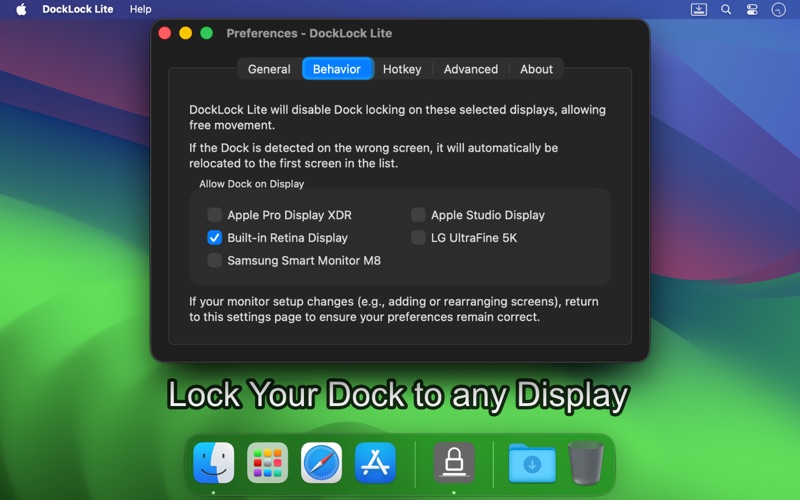
- Keeps your Dock fixed on the monitor you choose.
- Define which monitors allow Dock movement.
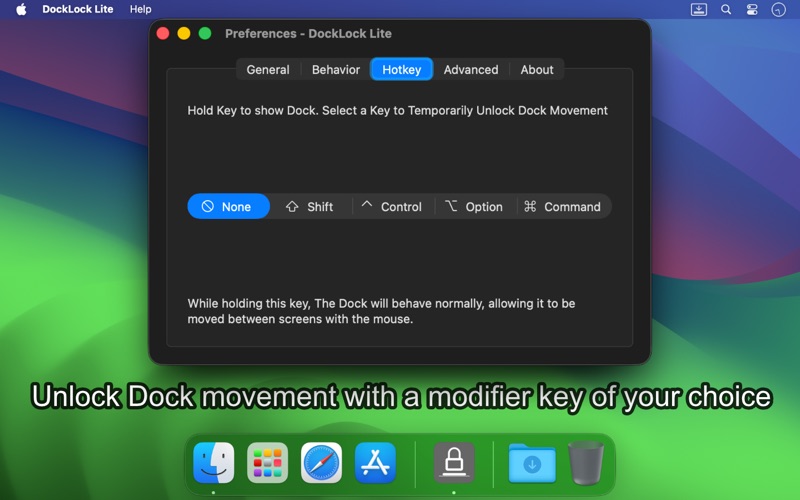
- Hold a key to move the Dock temporarily.
- Enable or disable Dock locking quickly via the menu bar.
- Launches automatically upon system startup (requires macOS 12+).
- Discrete Operation: Optionally hide Dock and menu bar icons.
- The Dock will be relocated after sleep or startup to the first screen selected in "Allow Dock on Display".
- Family Sharing Support
Do NOT purchase DockLock Lite if:
- You only have one monitor and do not plan to use an additional display or Sidecar.
- Your Dock is positioned on the left or right side of your screen.
- macOS option "Displays have separate Spaces" is disabled.
Important Notes
- Requires at least two connected displays to function.
- Sidecar (iPad) and DisplayLink counts as an additional monitor - DockLock Lite will function correctly in this setup.
- Works only when the Dock is positioned at the bottom of the screen.
- Command+Tab switching remains tied to the Dock's location.
- macOS option "Displays have separate Spaces" must be enabled for full functionality.
- DockLock Lite can only lock the Dock to screens where macOS allows it to be moved manually.
- macOS only moves the Dock to a screen if at least a few pixels of its bottom edge don't overlap another screen.
- DockLock Lite is a one-time purchase app with no subscription fees.
- DockLock Lite and DockLock Lite have identical features; the difference is the payment model (one-time purchase vs. in-app purchases).
Support & Feedback:
I am committed to continuously improving DockLock Lite. If you have questions, feedback, or encounter any issues, please contact me directly.
Thank you for choosing DockLock Lite!
Lock your Mac Dock and stop it from jumping screens!
Download DockLock Lite now and enjoy a stable multi-monitor experience.
Terms of Use (EULA): https://www.apple.com/legal/internet-services/itunes/dev/stdeula