
iPhone Screenshots
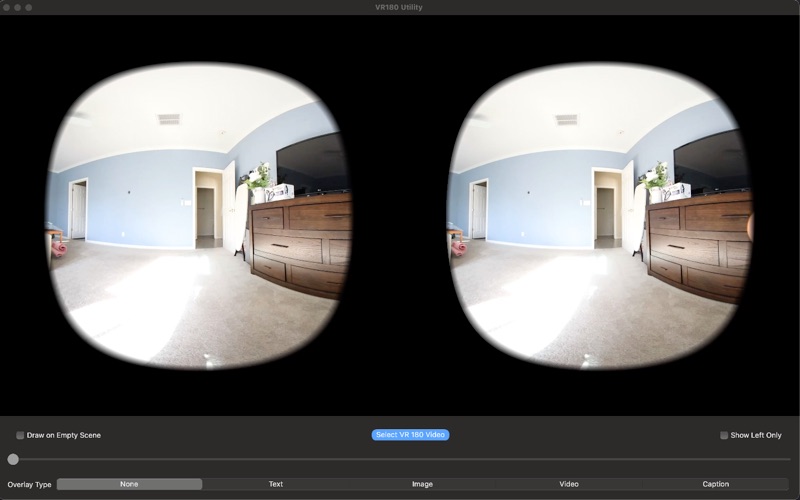


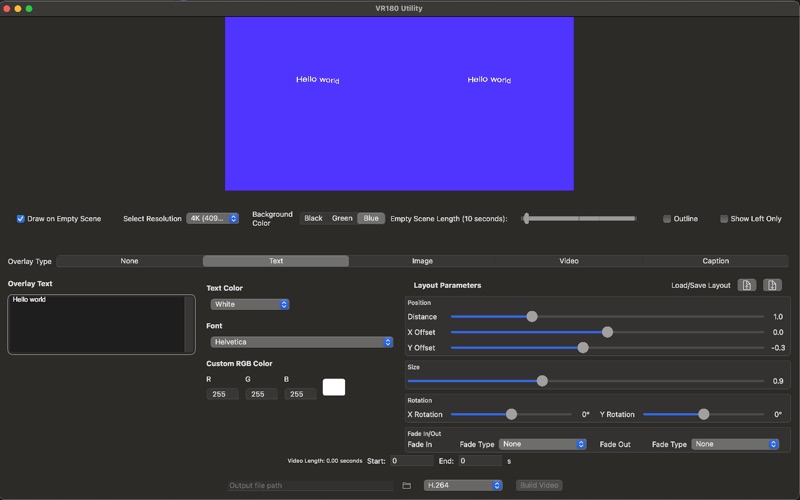

Description
Whether you're a content creator, educator, or VR enthusiast, VR180 Utility gives you powerful tools to enhance your immersive videos—without the hassle of traditional editing suites.
Key Features:
Create stunning text overlays with customizable fonts, animations, and new shadow support for improved readability
Seamlessly integrate images, logos, and now SBS images or spatial videos directly at the center of your VR viewpoint
Add picture-in-picture effects with 2D video overlay support
Include professional subtitles and captions for better accessibility
Export your videos in efficient H.264 or H.265 (HEVC) format for higher quality and smaller file sizes
Use black or green backgrounds in empty scenes—perfect for generating overlay videos you can easily key and composite in Final Cut Pro or other editors
Perfect For:
YouTube VR content creators
Educational and training VR experiences
Virtual tours and real estate showcases
Professional presentations and immersive storytelling
Live event and performance recordings
Say goodbye to complex post-processing. No need for Adobe Premiere—VR180 Utility lets you add professional-grade enhancements in minutes. Our intuitive interface keeps your workflow fast and focused while preserving the full immersive quality of your content.
Download VR180 Utility and take your VR videos to the next level—faster, smarter, and sharper.