
iPhone Screenshots




Description
PDF Auditor (prev. PDF Guru) is a powerful PDF inspection and analysis tool designed specifically for macOS users. Whether you're a professional managing document workflows or someone who needs detailed insights into PDF files, PDF Auditor provides comprehensive document intelligence at your fingertips.
Unlike a standard pdf editor, PDF Auditor allows you to inspect the internal structure of your pdfs ensuring you have all the information you need about your files' structure and security.
PDF Auditor helps you identify malicious and malformed PDFs and protects you from safety risks.
Highlights:
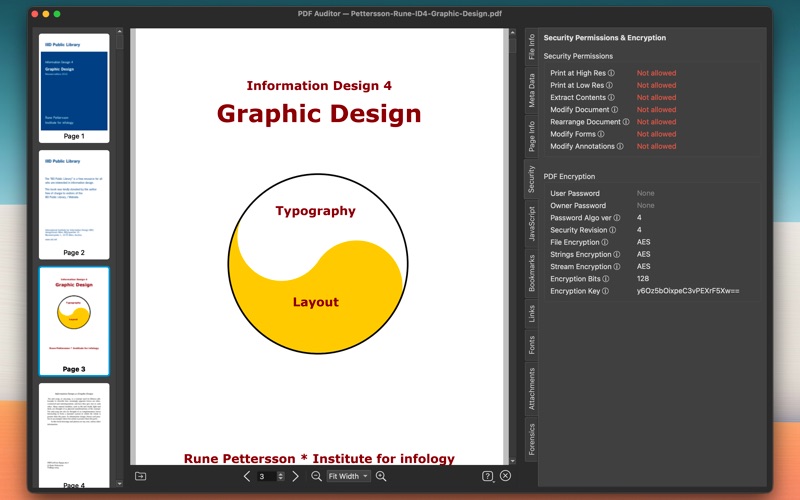
• Security Assessment: Review encryption status and document permissions
• JavaScript & Actions Inspector: Analyze embedded JavaScript with risk assessment and syntax highlighting
• Deep Forensic Analysis: Detect incremental updates, integrity issues, and security risks
• Attachments: Identify, analyze and verify embedded PDF attachments with checksum validation
• Page Structure: Review technical information about each PDF page eg. Dimensions, Geometry, Color Spaces and Transparency
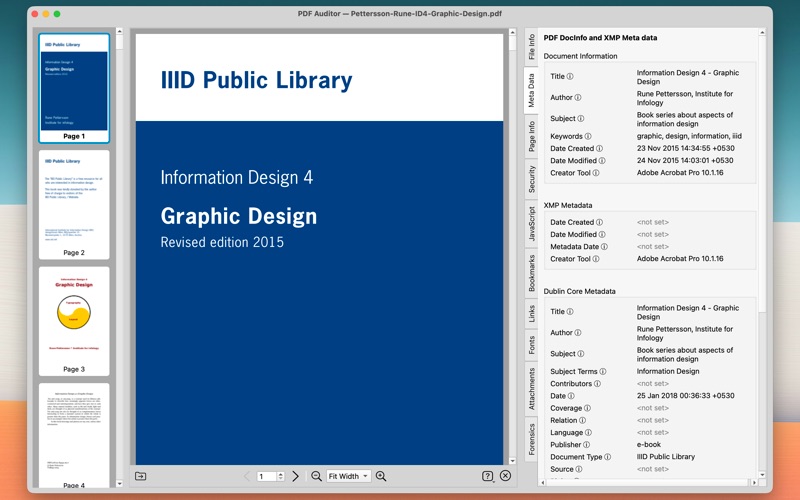
• Detailed Metadata Analysis: Inspect document properties, creation dates, and author information and other XMP meta data
• Bookmarks and Links: View and export PDF Bookmarks, Outline and Links
Perfect for:
• IT Professionals
• Security Analysts
• Document Management Specialists
• Digital Publishers
• Quality Assurance Teams
• Anyone working extensively with PDF files
Download PDF Auditor today and gain deeper insights into internals of your PDF documents.
———
** Complete List of Features: **
File Information & Validation
• Complete file details including size, page count, and PDF version
• PDF/A and PDF/X conformance checking
• Document linearization status (web optimization)
• Well-formed structure validation with detailed warnings
Deep Forensic Analysis
• Incremental update detection with version history
• PDF syntax warnings for linearized documents
• Integrity log for structural issues
• Security risk identification and classification
• Shadow attack and manipulation detection
Security & Encryption Analysis
• Comprehensive permissions review (print, extract, modify, forms, annotations)
• Encryption algorithm details (AES, revision levels)
• Password protection status (user/owner passwords)
• Stream and string encryption information
• Encryption key details (when accessible)
JavaScript & Actions Inspector
• Complete JavaScript and action inventory across the PDF
• Risk assessment with severity levels (Critical, High, Medium, Low, Safe)
• Syntax-highlighted code viewer
• Action trigger and location identification
• Searchable table with export to CSV/JSON
Page-by-Page Analysis
• Comprehensive page geometry and dimensions (points, inches, millimeters)
• PDF box specifications (MediaBox, CropBox, BleedBox, TrimBox, ArtBox)
• Content streams and resource analysis
• Per-page technical metadata
Font Intelligence
• Complete font inventory with detailed properties
• Font type identification (TrueType, OpenType, Type1, CFF, etc.)
• Font embedding and subsetting status
• Font encoding and character mapping details
Document Metadata
• Title, Author, Subject, Keywords extraction
• Creator application and Producer details
• Custom XMP metadata inspection
• Page layout and viewer preferences
Links & Navigation
• Complete hyperlink extraction across all pages
• Document outline and bookmark hierarchy
• Clickable navigation to bookmarked sections
• Internal and external link identification
Attachments
• List all embedded files with sizes and metadata
• Download attachments to any location
• Detected type validation (verifies actual MIME type from content)
• Checksum verification (MD5 validation against stored checksums)
Native macOS Experience
• Modern, clean interface crafted for macOS
• Dark mode support
• Drag-and-drop file opening
• Professional thumbnail navigation
• Detachable tabs for multi-window workflows
• Comprehensive export capabilities