
Moca - Monthly Calendar
Calendar access from the menu bar.
aill, k.k. (JP)
iPhone Screenshots



Description
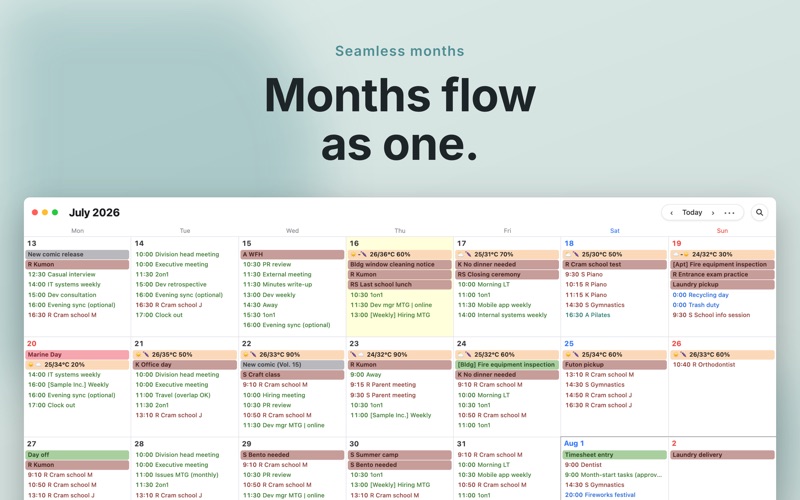
The app lives in the menu bar for quick calendar access. It connects vertically scrolling monthly calendars for easy schedule checking at a glance.
"Moca - Monthly Calendar" brings the popular iPhone / iPad calendar app "Moca" to your Mac.
It lives in your menu bar, so your calendar is always just one click (or one keyboard shortcut) away.
If the only view you ever use in Google Calendar is a custom "4 weeks" view, this app is made for you.
The iPhone / iPad version is free, so feel free to give it a try first.
■ Vertical scrolling
Monthly calendars are connected vertically into one continuous view, so you can scroll freely and check your upcoming schedule at a glance.
Since there are no page breaks between months, you can see next month's events just as easily — even at the end of the month.
■ Made for month-view people
Moca is designed for people who mostly use the monthly view in their calendar app.
Rather than showing every detail of each event, it focuses on letting you scan several weeks ahead at a glance.
■ Works with iCloud Calendar
Moca reads calendar data from the accounts configured in macOS.
Google Calendar and Apple's iCloud Calendar work as-is — no complicated in-app setup required.
* Configure accounts in System Settings > Internet Accounts.
■ Quick event entry
Type natural sentences like "Meeting 10am-12pm" or "Dentist tomorrow at 3pm", and Moca automatically parses the date and time to create the event — the fastest way to add plans.
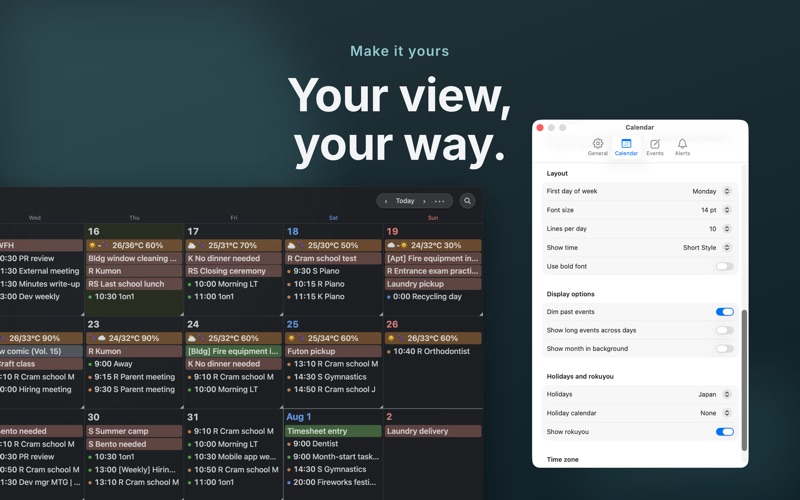
■ Minimal, essential customization
- Which calendars to show
- Holiday settings (US / Japan)
- First day of the week
- Font size, bold text, and how many events to show per day
- Event times in the month view
- Dark mode (automatic / always light / always dark)
- Rokuyō, the traditional Japanese six-day cycle
- Launch with a keyboard shortcut
- Show/hide the menu bar icon and Dock icon
■ Other features
- Event search
- Full screen
- Move events via drag & drop (hold Option to copy)
- Keyboard navigation (j / k for weeks, Space for months)
- Native support for Apple Silicon
Note: The Reminders feature is not supported.
■ One small request
Moca is developed by one person, who uses it every day to check their own schedule. If anything feels awkward or doesn't work properly, the developer would like to fix it — so please get in touch with support directly. Reviews don't allow the developer to ask about your situation or to follow up with you individually.
You are also welcome to contact support at the email address below.
app+[email protected]
■ Frequently Asked Questions
Q. How do I show an event as a bar?
Events with "All-day" turned on are shown as a bar.
You can also turn on "Multi-day event always shows on band" under "Options" in the settings screen, and events that span multiple dates will be shown as a bar even if they are not all-day.