
RAW Converter Ultimate
Convert RAW files to polished images.
SEASOFT LTD.
iPhone Screenshots



Description
The app converts camera RAW files into shareable images. It supports numerous RAW and common formats, allowing batch processing and local conversion.
RAW Converter Ultimate turns your camera's RAW files into polished, ready-to-share images — in seconds.
Get your files in, effortlessly. Drag and drop files anywhere in the window, or import them straight from Files and Photos. RAW Converter Ultimate reads the most popular camera RAW formats, including CR2, CR3, NEF, ARW, DNG, RAF, ORF, RW2, and PEF, plus JPEG, PNG, TIFF, HEIC, and other common formats.
Convert a whole shoot at once. Add as many RAW files as you like and convert them together. Every file appears in one list with its thumbnail, format, size, and resolution, so you can see at a glance what's queued up. Watch progress as your batch converts, and consult the conversion log whenever you need details.
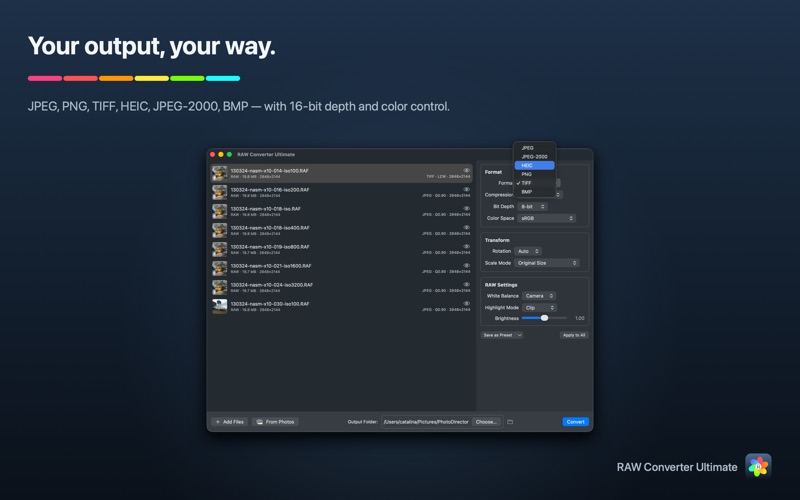
Your output, your way. Export to JPEG, PNG, TIFF, HEIC, JPEG-2000, or BMP. Dial in quality on the formats that support it, choose TIFF compression, and — for TIFF and PNG — export at true 16-bit depth with the color space of your choice. Fine-tune rotation and scaling: keep the original size, scale by percentage, fit to a width, height, or edge, or set exact pixel dimensions.
Develop your RAW files before you export. Take control of the RAW decode: set white balance to camera or auto, recover blown-out highlights with Clip, Recover, Blend, or Rebuild modes, and fine-tune brightness. Preview your changes live, tune until it looks right, then export with confidence.
Consistency across a whole batch, in one click. Set up a single file the way you like it and apply those settings to the rest of the batch. Save your favorite configurations as named presets to reuse on future shoots.
Fast, native, and private. Built for macOS with a clean, focused interface. All conversion happens locally on your Mac — no cloud upload required.
Start free. Go Pro when you're ready. The free plan includes 5 conversions a day, with no subscription required. Upgrade to Pro for unlimited conversions — as a yearly subscription or a one-time lifetime purchase — and restore your purchases anytime, on any Mac.
Privacy Policy https://getseasoft.com/legal/privacy-policy
Terms of Service https://getseasoft.com/legal/terms-of-service