
iPhone Screenshots

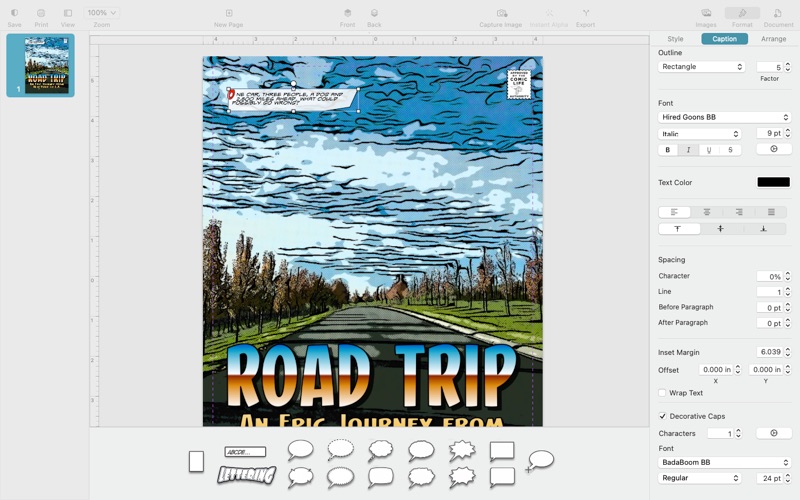

Description
Create stunning photo comics in minutes with Comic Life 4 desktop publishing system. Start with one of the many included templates to instantly create dazzling photo comics, visual diaries, newsletters, and more. Or use a blank template and create your own design. Easily add images, comic balloons, lettering. captions, and shapes.
Get started quickly
* Choose from over 60 plasq-designed templates to instantly create dazzling photo comics, visual diaries, newsletters, and more.
* Get quick access to photos and comic elements such as balloons, captions and lettering effects.
Dazzling comics
* Format your comic with gorgeous styles, fonts, filters, textures and halftone effects
* Easily add images from your photo library with the built-in browser
* Use styles to apply consistent effects across your pages
* Choose from over 70 included comic and creative fonts as well your own fonts
Image Filters
* Apply next generation filters to your photos for fun comic filter effects
* Dial in the perfect settings with the image panel
* Quickly erase backgrounds with the Instant Alpha tool
Balloons
* Create balloons with any number of tails and bubbles
* Tail options now include simple line stroke and burst options and more
* Easily wrap a bubble around lettering with the new Envelop action for dramatic speech effects
* Customize the bubble outline with shape operations
Captions
* Add a decorative cap (or caps) to the start of a caption for classic comic styling
* Connect captions in a caption thread for complex text layouts across a page.
* Customize the caption outline with shape operations
Lettering
* Easily create dramatic sound effects with the new Line lettering mode where lettering is laid out along a path
* Create block titles with single or multiline lettering
* Apply 3D styling for classic comic titling effects
Script editor
* Create a comic story with a script
* Drag and drop script elements right on to your comic pages
* Configure script styles to make the layout fast.
Advanced tools
* Combine shapes to create unique caption, balloon and panel designs
* View pages side by side as you work
* Turn on facing pages to format your comic as two-page spreads
* Pin, lock or group elements on your pages
* Use a master page to create common elements across your pages
* Create comic templates to get consistent designs and styling across your comics
* Invert the balloon tail connection in multi bubble balloon assemblies
Share your creations
* Export your comic to PDF, EPUB, CBZ or Images
* Print wirelessly using AirPrint, including page range selection, number of copies and two-sided printing