
iPhone Screenshots


Description
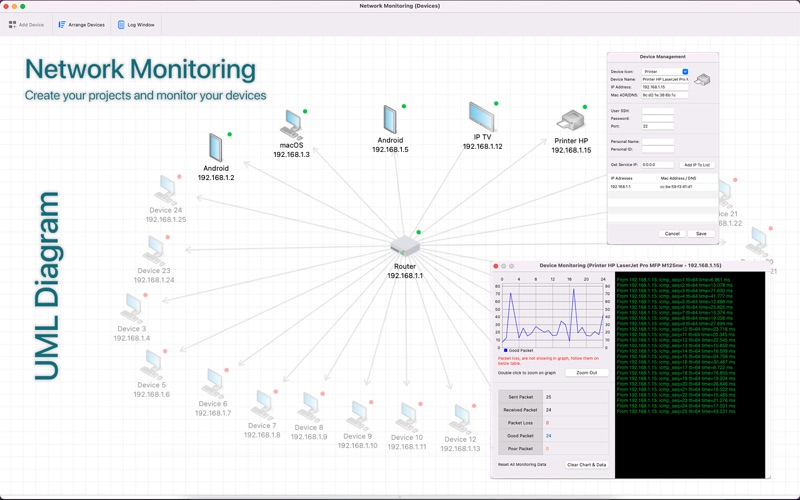
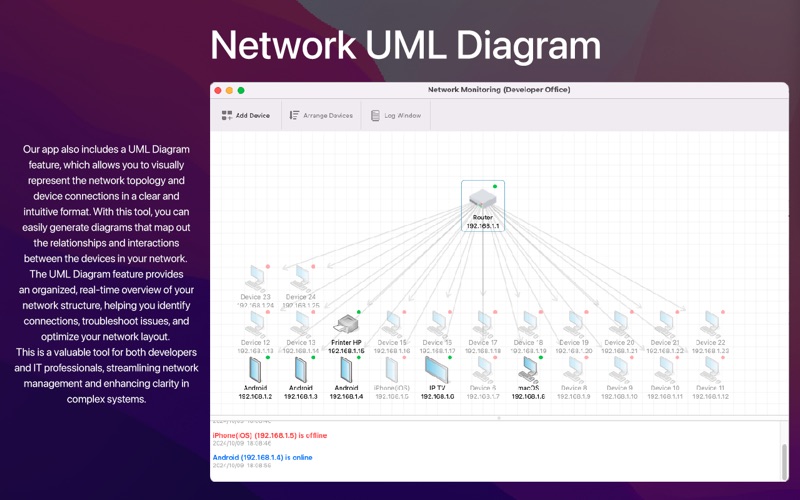
"Network Monitoring" is your comprehensive solution for seamless network management. Create custom projects, scan IP ranges, and visualize your entire network in an intuitive UML diagram. The app automatically detects and tracks all online devices, displaying clear status indicators—green for online and red for offline—giving you real-time visibility into your network's health.
With powerful device management tools, you can effortlessly manage every device with right-click options. Update device details, including name, IP address, MAC address, personal information, and SSH credentials. Track device performance with real-time ping logs and graphs, and use secure SSH or Telnet connections to directly access devices when necessary. Easily remove devices from the network when they are no longer in use.
Network Visualization: Detect devices in your network, including various operating systems, while providing seamless monitoring and control through your macOS environment.
Device Management: Use the right-click menu to edit device details, configure SSH connections, or delete devices. Organize your network by manually adding and arranging devices within the diagram.
Real-Time Monitoring: Track devices using live ping results, performance graphs, and detailed log monitoring to ensure smooth network operations.
Secure Connections: Manage device connections via SSH or Telnet, offering you secure, direct access to network devices without hassle.
Project Manager: Add and manage network projects for efficient administration. Quickly monitor specific IPs or network segments, perfect for IT administrators needing rapid, effective control over their devices.
Whether you’re maintaining an office network, monitoring servers, or managing multiple devices, "Network Monitoring" delivers the advanced tools you need to keep your network running smoothly.