
iPhone Screenshots
Description
Allows users to select and copy colours from their screen directly via the menu bar. It supports multiple format outputs including HEX, RGB, HSL, and UIColor. Users can copy colours to code or text fields instantly.
PixelPick is a powerful, lightweight colour picker designed specifically for macOS developers and designers. Quickly and accurately copy a colour to the code or text format of your choice, all while experiencing a seamless native experience that fits perfectly into your workflows.
# Effortlessly pick and copy any colour from your screen from the always-ready menu bar item. Whether you're designing interfaces or debugging stylesheets, PixelPick gives you total control:
- Click the status item to instantly activate the picker
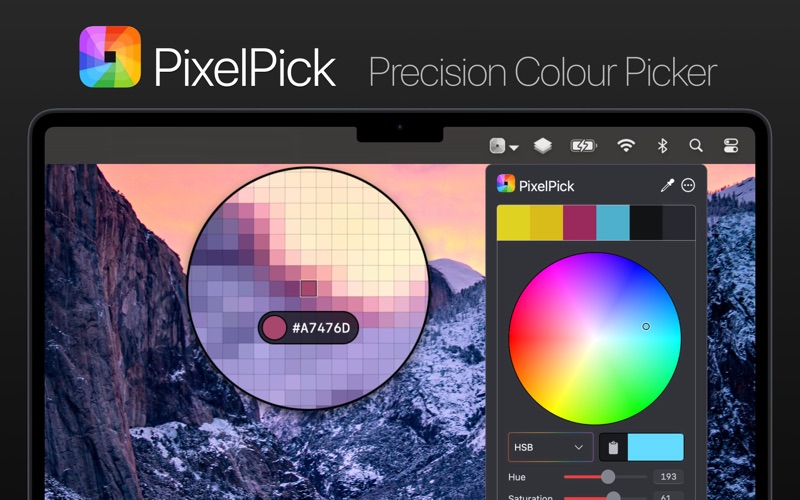
- Follow your cursor live to see a magnified view of your screen and sample any pixel
- Use arrow keys for pixel-by-pixel precision (hold Shift to move faster)
- Zoom in/out with your scroll wheel, or resize the selector with ⌥ + scroll
- Lock in your colour with Return or a click, and copy it instantly
- Hold ⌘ to keep selecting colours without interruption
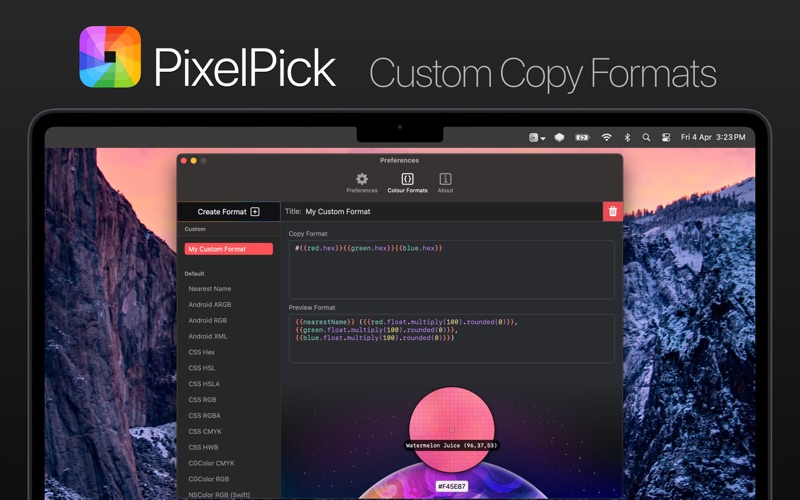
# No two workflows are the same. PixelPick lets you copy colours in the exact format you need:
- Built-in developer and designer centric formats like CSS Hex, NSColor, UIColor, and much more
- Curate your own custom formats using a flexible templating system, tapping into advanced colour attributes like RGB, HSL, HSB, CMYK, and even descriptive names
- Apply formatters and modifiers to fine-tune your output – perfect for working with APIs, design systems, or codebases
# Easily adjust a previously picked colour without needing to resample. Fine-tune brightness, saturation, or individual colour attributes and copy the updated colour in any format:
- Colour wheel with interactive adjustment
- Edit individual HSB, HSL, RGB, CMYK components
- Easily access the current colour hex value
- Convert a colour to and from a descriptive name
# Why PixelPick?
PixelPick is fully native and privacy conscious. It integrates beautifully with macOS, gives you unmatched format flexibility, and was crafted with attention to detail for those who care about precision and design.
Whether you're coding, designing, or tweaking colours in between, PixelPick gives you the exact colour you need — how you need it.
# Free to try
PixelPick is free to download, letting you try out its core features. If you find it useful, you can unlock built-in and custom colour formats with a one time in-app purchase. No subscriptions here!