
iPhone Screenshots


Description
**The professional Markdown editor for Mac with integrated artificial intelligence**
Markdown Editor Pro is a complete and powerful Markdown text editor designed for writers, developers, bloggers, and professionals who need a fast, elegant, and feature-rich writing tool.
### ADVANCED SYNTAX HIGHLIGHTING
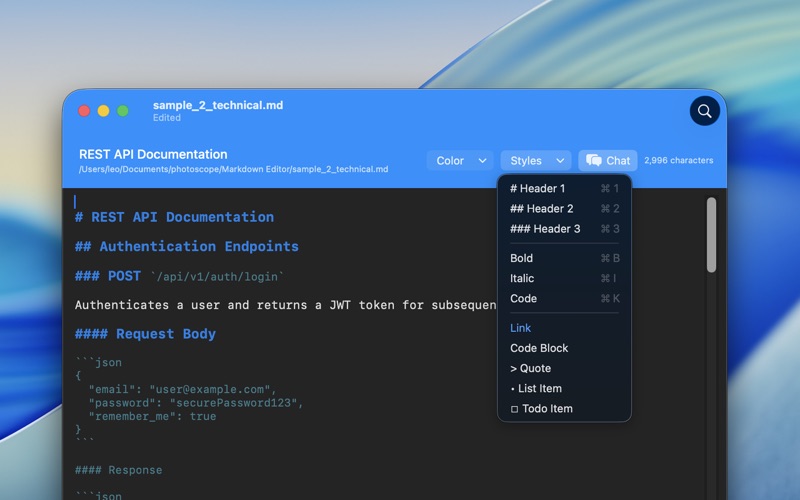
The editor provides real-time Markdown syntax highlighting with a customizable color scheme. Each Markdown element is automatically colored for better readability:
- Headings (H1–H6) with progressive sizes
- Bold and italic text
- Inline code and code blocks
- Links and references
- Numbered and bulleted lists
- Blockquotes and to-do lists
- 25 built-in color schemes to choose from
### QUICK MARKDOWN FORMATTING
Instant text formatting with quick commands and keyboard shortcuts:
- Headings (Command+1, 2, 3)
- Bold (Command+B)
- Italic (Command+I)
- Inline code (Command+K)
- To-do list (Command+T)
- Bullet and numbered lists
- Blockquotes and code blocks
- Links and references
Full contextual menu with instant access to all formatting commands.
### BUILT-IN AI FEATURES (OPTIONAL)
The app includes 10 AI-powered writing tools to boost productivity. Integration with OpenAI is fully optional — the app works perfectly without API setup.
Available AI functions (with shortcuts):
- Summarize text (Command+Option+S)
- Sort content (Command+Option+O)
- Convert to list (Command+Option+L)
- Expand text (Command+Option+E)
- Professional tone (Command+Option+P)
- Formal tone (Command+Option+F)
- Conversational tone (Command+Option+C)
- Grammar correction (Command+Option+G)
- Translation (Command+Option+T)
- Explanation (Command+Option+X)
### AUTOMATIC RICH TEXT CONVERSION
Smart automatic conversion from Rich Text to Markdown:
- Copy formatted text from any app (browser, word processor, email)
- Paste into the editor
- Content is automatically converted to Markdown while preserving all formatting
- Supports bold, italic, headings, lists, links, tables, and code
- No data loss during conversion
### CUSTOM ACTIONS
Create your own AI-powered functions with custom prompts:
- Define personalized prompts for any text operation
- Assign icons and keyboard shortcuts
- Save and reuse your favorite actions
- Quick access via contextual menu or global shortcuts