
iPhone Screenshots




Description
AR Drawing – Draw Sketch Camera
Turn Your Ideas into Stunning Art with AR Technology
Discover a whole new way to create art with AR Drawing, the powerful AR sketch camera that turns your ideas into real drawings using cutting-edge augmented reality. Whether you love anime drawing, realistic portrait sketching, step-by-step tutorials, character design, or simple trace drawing, AR Drawing makes the entire experience effortless, fun, and incredibly inspiring.
How to Use AR Drawing
Step 1: Start Drawing with the AR Sketch Camera
Open the app, point your phone camera at any surface, and instantly see a sketch appear through AR drawing projection. Just trace the lines and start drawing anime characters, portraits, objects, animals, or any sketch style you like.
Step 2: Stabilize Your Device
Place your phone on a tripod or a stable surface to enjoy the smoothest, most accurate AR sketching experience.
Step 3: Choose Your Drawing Inspiration
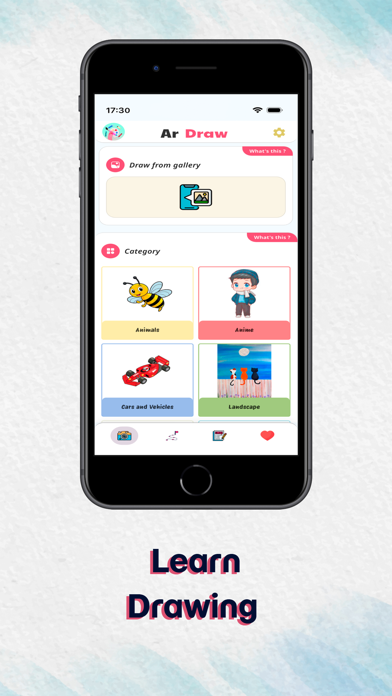
Explore 10 different drawing categories including anime, portraits, animals, objects, and more. You can also upload your own photos to transform them into traceable AR sketches using the draw with camera feature.
Step 4: Learn with Step-by-Step Drawing Mode
Follow beginner-friendly guides that break every sketch into simple steps—from basic shapes to detailed line art. Perfect for anyone learning how to draw, from total beginners to advanced artists.
Key Features to Boost Your Creativity
10 Categories of Ready-to-Draw Images
Browse a rich library packed with anime sketches, portrait templates, character guides, object drawing, and more—ideal for every drawing level.
Draw Using Your Gallery (Sketch Camera Import)
Upload your own images and instantly convert them into AR-guided trace drawings, perfect for custom art and personal sketch projects.
Step-by-Step Drawing Lessons
Improve your sketching skills with detailed tutorials that teach proportions, shading, structure, line art, and anatomy basics.
Drawing Blog & Creative Tips
Access an ever-growing art blog featuring drawing tips, sketching guides, anime drawing lessons, character design basics, and inspiration for leveling up your creativity.
Why Choose AR Drawing?
AR Drawing isn’t just another drawing app—it’s a complete AR sketch learning platform. Whether you're improving your portrait sketching, starting anime drawing, or practicing character art, AR Drawing provides everything you need:
- AR-powered drawing & sketch projection
- Step-by-step drawing tutorials
- Art blog with guides, tips & drawing inspiration
- Custom image tracing from your gallery
- Ideal for beginners and professional artists
- Perfect for anime drawing and character design
Ready to Unlock Your Artistic Potential ?
Download AR Drawing – AR Sketch Camera now and create stunning, professional-looking drawings anywhere, anytime with the power of AR drawing and sketch tracing!
Terms of Use: https://www.apple.com/legal/internet-services/itunes/dev/stdeula/
Privacy Policy: https://www.termsfeed.com/live/e96ecdc1-9583-4486-906f-b2fb8eae6663