
iPhone Screenshots




Description
With the App Ten Typing Fingers you learn and practice typing on the Mac.
LESSONS
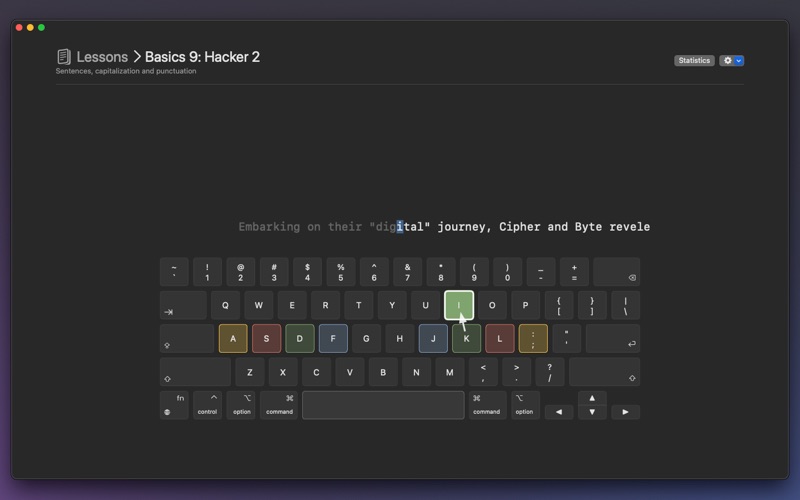
The app contains numerous lessons with increasing difficulty levels. It displays the keyboard layout so you can see directly which keys to use in each lesson.
TRAINING
Ten Fingers includes an intelligent typing trainer. Upon a wrong key press, the user receives immediate visual and/or auditory feedback, indicating the mistake. You can choose how the typing trainer reacts to typing errors.
Choose from 4 types of reaction to errors:
• Free Choice: You decide whether to correct or ignore the error.
• Continue: The error is marked, and the training continues.
• Pause: Mistakes are counted but not displayed.
• Correction: Typing errors must be corrected using the backspace key.
VIRTUAL KEYBOARD
During typing training, a virtual keyboard is displayed, allowing users to clearly see which key to press next. This visual feedback enables learners to check their finger positions and improve their accuracy and typing speed. The dynamic keyboard display ensures that users always have an overview of the keys to hit, enabling effective and targeted training.
METRICS
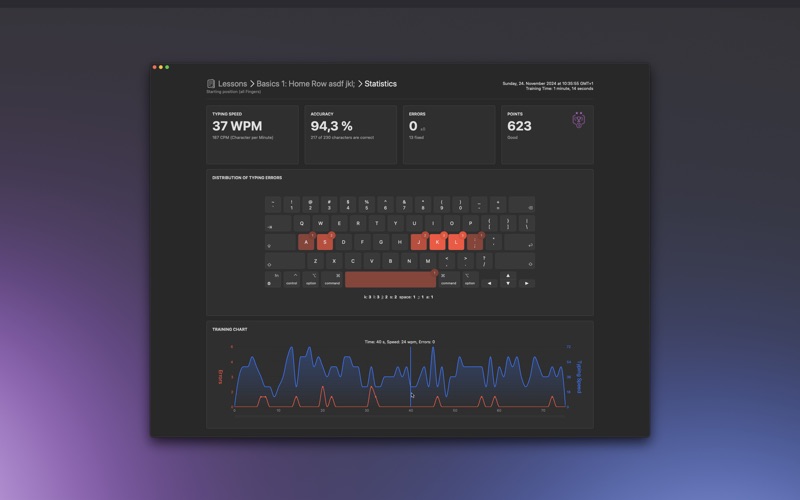
• Typing Speed: Displayed in WPM (Words Per Minute) and Characters Per Minute.
• Accuracy: Displayed in percentage and indication of correct characters.
• Typing Errors
• Points: This value evaluates accuracy relative to speed.
STATISTICS
On a separate page, you can view all previous training results and see if you have improved or worsened compared to the previous result. Additionally, you will see the distribution of typing errors here to quickly identify which keys you frequently mistype.