
Nool - Notes, Diary, Memo
Record notes, images, and audio in categories
雪梅 许
iPhone Screenshots



Description
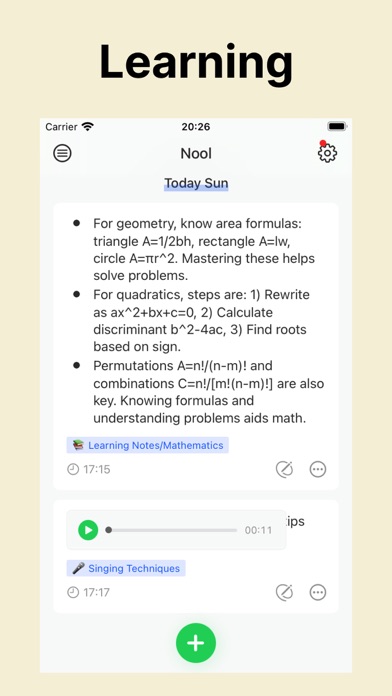
Record notes, diaries, and reminders using text, images, Live Photos, videos, audio, or geolocation. Organize entries with up to four custom categories and multilevel tags. Add questions to prompt detailed responses.
Nool is a minimalist card-based recording tool that you can use to jot down anything, such as notes, diaries, inspirations, memos, and reminders.
- Multiple Recording Methods
Text, images, Live Photos, videos, audio, and geolocation.
- Custom Categories
The home page is a default timeline, but you can enable categories in the settings, with up to four main categories available.
- Multilevel Tags
Use multilevel tags to better organize and summarize your records.
- Questions and Titles
These are more suitable for summarizing and categorizing than tags, which are best kept short. Titles and questions, however, can be lengthy.
- Card associations
External link, internal link, external reference, and internal reference—four types of associations that make connections between cards more flexible.
- Calendar
A combination of heat maps and image calendars allows you to see your recording trends.
- Map and Geolocation
Add or edit locations, view your records on a map, and enable the option to read timestamps and locations from your photos in the settings.
- Personalization
Customize theme colors, background images, and app icons as needed.
- Notifications
A minimalist notification feature that works well with checklists.
- Sharing
Convert your content into images to share with friends.
- Cloud Sync
If you are logged into iCloud on your device, all content is automatically saved to your iCloud account. This data is not stored on our servers, ensuring absolute privacy. To use this feature, ensure that both iCloud and iCloud Drive are enabled.
- Password Lock
Enable a password lock for the app.
- Data Security
We do not have a backend server and do not save or collect your data. All data is stored locally. If iCloud sync is enabled, your data will be uploaded to iCloud.
-----------------------
- Subscription information:
If you choose to subscribe to the membership, the fee will be charged to your iTunes account. The system will automatically renew and charge your account 24 hours before the end of the current billing period. After purchase, you can go to the settings interface of the iTunes Store at any time to turn off the auto-renewal feature. Prices may vary by region. If the price changes, there will be no prior notice. The current subscription cannot be canceled during the active subscription period.
- Terms and Conditions:
https://hellome-fun.github.io/terms/terms_conditions_en.html
- Privacy Policy:
https://hellome-fun.github.io/privacy/privacy_policy_en.html