
iPhone Screenshots





Description
NexaPDF is a powerful, feature-rich PDF editor designed for seamless PDF reading, editing, and annotation. Effortlessly modify text, add comments, highlight key details, and organize your PDFs with ease. With an intuitive interface and advanced tools, NexaPDF streamlines your workflow—whether you’re reviewing documents, taking notes, or modifying PDF content. Enjoy a seamless and unrestricted PDF experience. Perfect for professionals, students, and anyone who works with PDFs daily.
Edit TEXT & IMAGE & LINK
- Add, edit, crop and adjust images in PDFs
- Add, edit links in PDFs
- Add, edit, adjust page contents in PDFs
Pages Organize
- Rotate,delete,rearrange pages
- Add new blank pages, and support appending pages from another PDF file
- Support extract pages from PDF file
- Cut, copy, paste pages
ANNOTATE
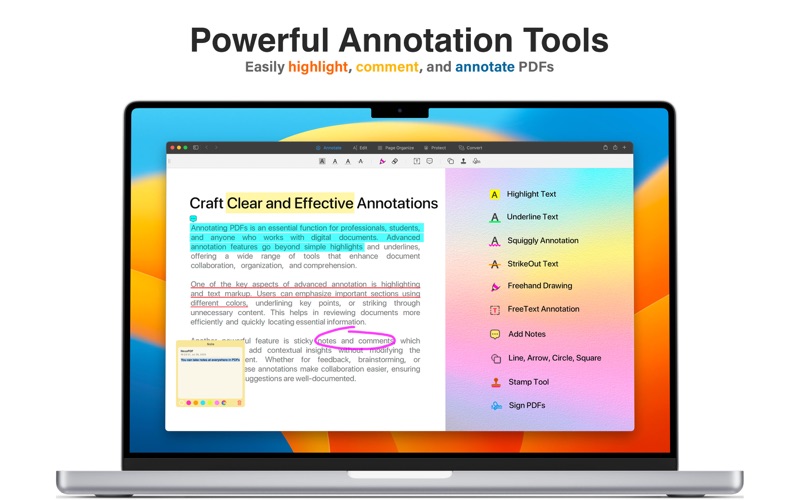
- Annotate PDFs with highlight, underline, squiggly, strikeout text in self-defined colors
- Add lines, arrows, rectangles, ovals with multiple styles to PDFs
- Insert comment and add notes to PDFs easily
- Support free-hand drawing in PDFs with pencil, also support eraser tools
- View and manage annotations conventiently in annotation tables
STAMP
- Add and resize stamps within PDFs as you want
- Insert build-in or dynamic stamps, including APPROVED, VOID, FINAL and more
SIGNATURE
- Add signature to any PDFs with mouse or trackpad
- Move and resize signature as you needed
- No-limited numbers of signature to use
READ & PRINT
- Support multiple modes to view PDFs: multi-tab viewing, full-screen, page-fit, single-page or double page display mode
- Open recent PDFs conventiently when start the app, also support Drag & Drop to open files from the Finder
- Easily zoom PDFs in or out in a great range
- Search word in PDFs quickly and find text precisely
- Bookmark specific page in PDFs effortlessly
- Print PDFs directly on your device
Have any feedback or issue? Please send an email to [email protected]
Terms of Use: https://www.apple.com/legal/internet-services/itunes/dev/stdeula/