
iPhone Screenshots





Description
video and audio files, or Text-to-Speech synthesis for online articles. After all there is always a story behind these voices that you are so familiar and love, it makes easier for you to remember them.
Important features include:
(1) Support 3 modes of text extraction:
(a) Subtitle
(b) Transcription
(c) Online Article, local PDF file & Share Extension
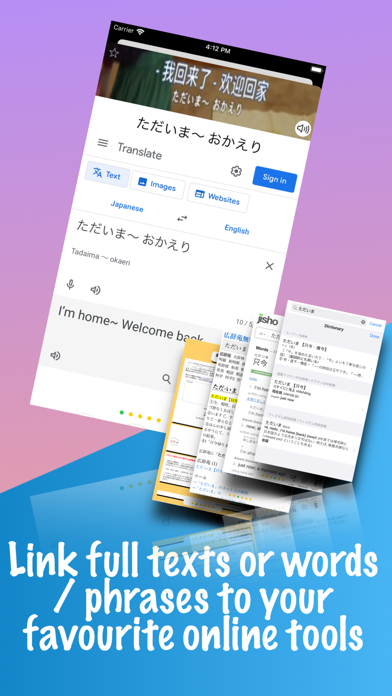
(2) Link to your favourite online language learning tools
- You can study the texts sentence by sentence and word by word with your favourite online tools
- Easy access to romanization for Japanese and pinyin for Chinese that can allow you to quickly learn how to pronounce each word
- Easy access to Accent guidance for Japanese to help you grasp the rhythm
- Easy access to grammatical breakdown to help you identify each part of speech
- You can highlight individual word and phrase of the texts to find out their meaning and usage
- Online tools are grouped by language so you have different sets of tools for learning different languages at the same time
- Anata comes with recommended online tools. You can use them out of the box or add your own
- Anata sends predefined prompts to chatbots (currently support OpenAI ChatGPT, Google Gemini, Anthropic Claude, DeepSeek, Perplexity, xAI Grok, Alibaba Cloud Qwen) to analyse sentences/keywords and make sentences/stories. You can design your own prompts and let AI help you learn foreign languages
(3) Search
- Once you have a few titles in Anata, you can start searching them for words and phrases and learn how to use them in different contexts
- Even when you come across a new word outside Anata, you can also search it in the App to see if it is used in your favourite dramas and movies
- If a word does appear in your library of dramas & movies, you can add it to Keyword for further study
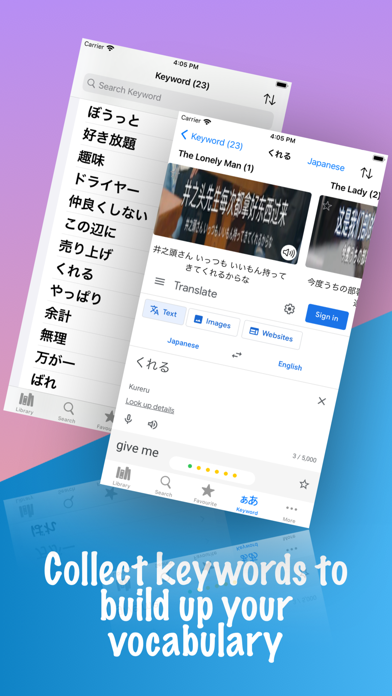
(4) Keyword
- You can collect new words and phrases as Keyword to enrich your vocabulary, which is important to become proficient in a language
- As in Search, each keyword will link to the titles in which it appears
- Keyword is also linked to online tools so you can perform in-depth study
(5) Favourite
- If you like a particular “tile” (a term used to refer to a collection of text, image and audio clips for a subtitle text), you can add it to Favourite for future review
- You can add a small segment of the story that consists of multiple tiles to Favourite to preserve its entirety
(6) Notes
- It is important to write down your own thought and understanding so you can internalize what you have learned
- You can take notes for both Keyword and Tile
- You can study notes separately in the Notes section without navigating all the keywords and tiles. That gives you a quick way to refresh your memory of the key learning in the past
(7) Explain
- Anata provides a handy Explain section for you to send any ad hoc words and phrases to any online tools
- You can also add these ad hoc words / phrases to Keyword, no matter they are used in your library of titles or not
- You can access Explain from other Apps by highlighting and sharing text via Share Sheet
(8) Multiple Languages Supported
- Japanese, Chinese (both Traditional and Simplified), Korean, German, French , Spanish, and English
(9) In-App Purchase
- Anata is free for use for a limited number of titles and keywords that you can add; all functionalities of the App are available though
- Anata Unlimited is available for purchase in the In-App Purchase section
(10) Non English App User Interface Language
- Currently support Chinese (both Traditional and Simplified) and Japanese as alternative user interface languages
Anata is meant to be a supplementary tool to your language learning need. It does not replace standard learning courses and textbooks. You are advised to acquire a basic knowledge of a language before you can reap the benefit of using Anata to improve your proficiency.