
iPhone Screenshots




Description
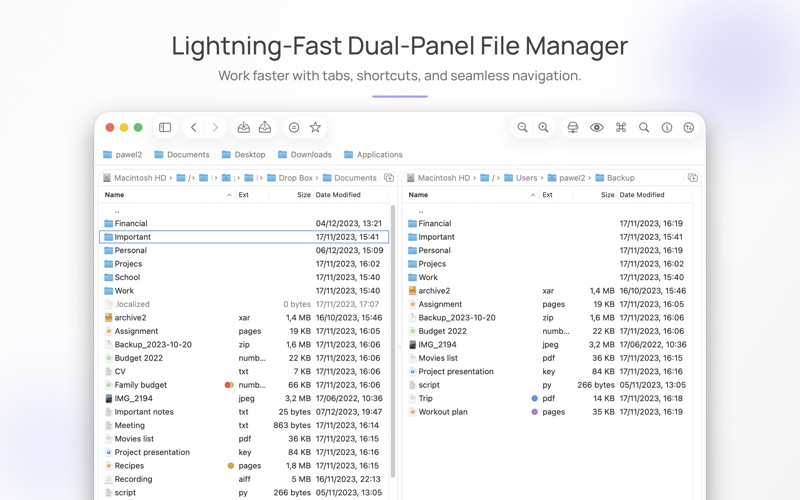
DoubleXplorer is a powerful dual-panel file manager designed for professionals who need fast navigation, seamless remote access, and efficient workflow tools. Work smarter across local drives, servers, and archives with one unified interface.
Key Features:
Performance & Efficiency
• Dual file panels with Tab-key switching
• Keyboard shortcuts for fast operation
• Blazing-fast performance for everyday tasks
• Multiple tabs that can be moved between windows
• Convenient mouse selection
Local & Remote Access
• Connect to FTP, SFTP, Dropbox, and Microsoft OneDrive
• Open and edit files from servers and archives with automatic synchronization
Archives & File Operations
• Rich archive support: 7z, Rar, Tar, Zip, and more
• Operations queue with file conflict recovery for safe processing
Search & Navigation
• Quick Search directly within the active panel
• Advanced file search with rule support and presets
• Virtual Folders for organizing files based on your rules
• Side Bar and Bookmarks Bar for fast folder access
Tools for Power Users
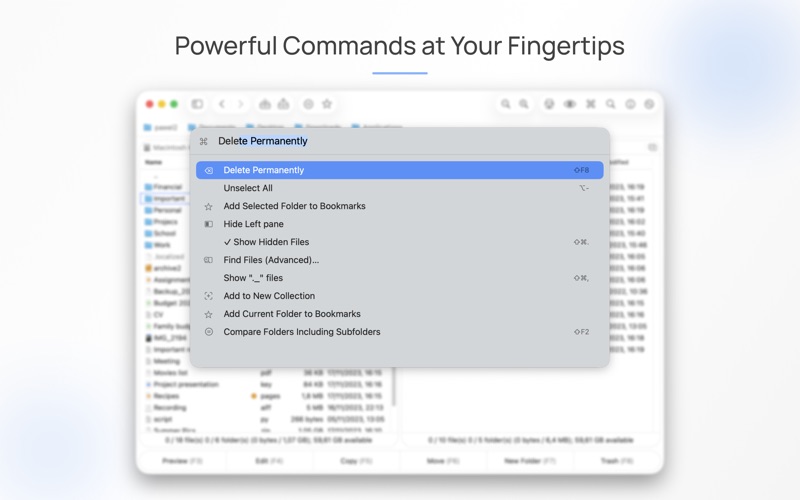
• Command Palette for quick actions and navigation
• Folder compare for analyzing differences
• Extensions: open your own applications and assign custom shortcuts
Preview & Appearance
• Built-in file preview with syntax highlighting for source code
• File Details panel with small preview
• Customizable appearance with personal color schemes
If you'd like to try DoubleXplorer before purchasing, a free trial version is available on the app’s website.