
iPhone Screenshots


Description
The app offers PDF size reduction with auto/manual tuning and batch processing. It allows users to shrink PDFs for uploads, storage, or sharing, balancing file size and visual fidelity.
PDF Compress Expert is an all-in-one, user-friendly and robust PDF size reduction utility exclusively built for macOS, enabling effortless PDF compression with flexible auto/manual tuning, side-by-side quality preview and comprehensive batch processing tools. Whether you need to shrink PDFs for quicker cloud uploads, save local disk storage or streamline document sharing, this professional PDF compressor delivers customizable compression solutions to balance file footprint and visual fidelity perfectly, alongside full multi-language localization and native light/dark appearance support unavailable on most competing alternatives.
### Flexible PDF Import & Convenient File Selection
Import PDFs in multiple intuitive ways: drag-and-drop files directly onto the file list or app icon, right-click target PDFs in Finder and open with PDF Compress Expert for instant addition. The file list fully supports standard macOS keyboard shortcuts: use Command for disjoint multi-selection and Shift for continuous bulk selection, letting you quickly mark any group of documents to configure compression settings and perform one-click batch export later. You can also add entire folders to queue up dozens of PDFs for unified compression tasks.
### Dual Compression Modes: Auto Presets + Fully Manual Custom Tuning
Choose from multiple ready-made compression tiers for one-click automatic optimization to suit different usage scenarios, just like industry-standard preset workflows. For advanced users, unlock full manual customization: precisely define image DPI downsampling values and JPEG compression quality ratios to manually control final file size and output image quality, downsize embedded graphics drastically without unnecessary quality loss or document structure corruption. The app erases redundant PDF objects, unused metadata and orphaned resources to maximize compression efficiency alongside image optimization.
### Real-Time Side-by-Side Original vs Compressed PDF Comparison
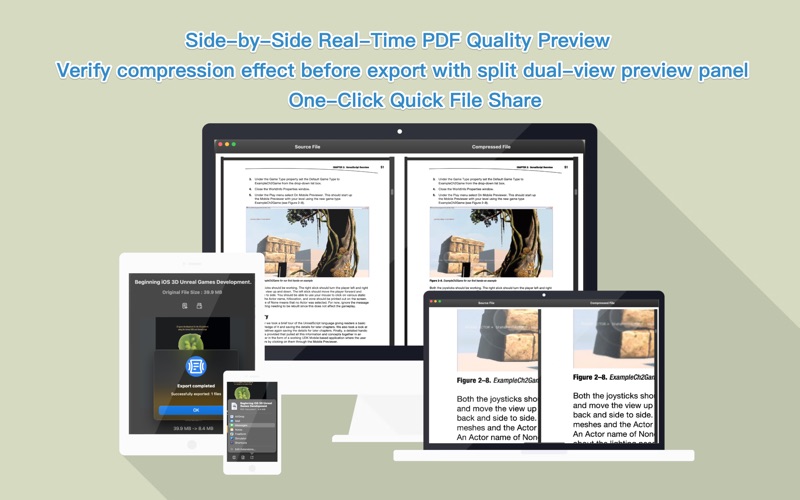
Evaluate compression outcomes visually via built-in dual-panel preview: load your source PDF and compressed version side by side within a single window to inspect page details, font rendering and image clarity synchronously. The split viewer supports intuitive two-finger pinch-to-zoom for instant magnification adjustment, letting you closely check zoomed page contents conveniently to decide whether the compressed result matches your quality requirements before final bulk export, avoiding wasted storage from unsatisfactory compressed files.
### Powerful Batch Compression & One-Click Bulk Export
Group selected PDFs freely via macOS native selection shortcuts, apply identical customized compression parameters to all picked documents in bulk, then export all finished compressed PDFs to your preferred target folder in a single operation. Process multiple files concurrently leveraging multi-core CPU resources for accelerated batch compression, drastically cutting waiting time when handling large PDF batches. Multiple output destination rules are available to replace source files, pick custom save paths or fix a default export directory as needed.
### Global Multi-Language Support + Native Light & Dark Theme
Stand out from similar PDF compressors with extensive worldwide localization: the app natively supports English, French, German, Japanese, Italian, Spanish, Portuguese, Russian, Turkish, Polish, Dutch, Simplified Chinese, Traditional Chinese, Indonesian, Vietnamese, Thai and Malaysian for seamless regional usage across global users. Toggle freely between system-compliant Dark Mode and standard Light Mode to match your macOS desktop appearance and reduce eye strain during long document processing sessions.