
iPhone Screenshots
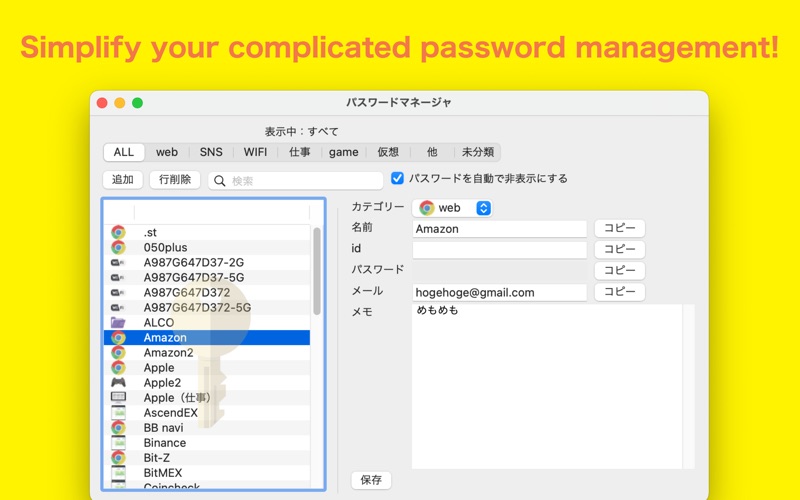


Description
Are you struggling with managing numerous passwords? This app is a password management application that allows you to easily manage and quickly access a large number of passwords through simple operations.
You can save the following information as a bundle:
- Name
- ID
- Password
- Memo
- Category
[Features]
■ Category Function
- You can classify accounts into categories.
- You can create your own categories.
- You can filter the display content in the list by category.
■ Search Function
- You can filter the display content in the list by search text.
(You can use it in combination with category filtering.)
■ Copy Function
- You can copy saved passwords to the clipboard with a single touch by pressing the copy button.
■ Backup Function
- You can convert the app's data into text format.
- The converted text is stored in the clipboard and within the app.
■ Restore Function
Overview:
You can load the text created with the backup function into the app. There are two methods for restoration:
[Method 1: From Backup within the App]
Tools → Backup → Restore
Select the desired backup and press the restore button.
[Method 2: From Backup Text]
Tools → Backup → Restore from Text
You can directly specify and restore the backup text created in this app. Please use it when you want to restore the app on iOS or Android versions.
*Note:
The restore function loads the specified data after deleting everything.
For safety, please make a backup before performing this operation.
Also, please note that the backup category selection icon will not be restored in the current version. After performing the backup, please reset the icon in "Tools > Edit Categories".
■ Password Generator
You can generate random passwords by specifying options and the number of characters.
Example: A password of 8 characters that includes symbols, lowercase letters, uppercase letters, and numbers → U)#3fqaI
■ Password Auto-Masking
By checking the checkbox to automatically hide the password, the password will be masked after a certain period of time. This feature reduces the risk of accidental information exposure during desktop sharing or screenshots.
!!! Caution !!! (To prevent data loss accidents, please read and understand the following before using)
1. Make frequent backups.
For security reasons, this app does not perform any communication (excluding ads), and the data only exists on the user's device. In the event of accidental deletion or any other reason resulting in data loss, we cannot provide any support. Therefore, please make frequent backups and use it at your own risk.