
Whisper Notes - Speech to Text
Record audio, transcribe , store locally
SmashMelon LLC
iPhone Screenshots


Description
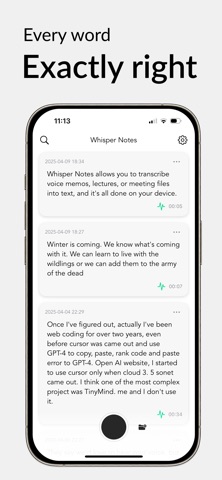
Record voice or import audio/video files for offline transcription. Transcribe meetings, lectures, and ideas without internet. Import from Photos, Voice Memos, WhatsApp, and extract subtitles. Lock screen widget for quick access.
Maybe the best offline transcription app — 70,000+ journalists, researchers, and professionals seem to think so.
Turn meetings, lectures, and voice memos into accurate text with speaker labels — fast, 100% offline, on your device. No subscription. One purchase, yours forever.
■ Core Features
- Record voice memos and capture ideas instantly—from the Lock Screen, widgets, Control Center, the Action button, or just say "Hey Siri"
- Import audio and video from any app (WhatsApp, Photos, Voice Memos, etc.), several files at once—even extract subtitles
- Turn meetings, lectures, and interviews into transcripts with speaker labels—see who said what and name each speaker
- Fix a word where you read it: double-tap any paragraph to edit in place
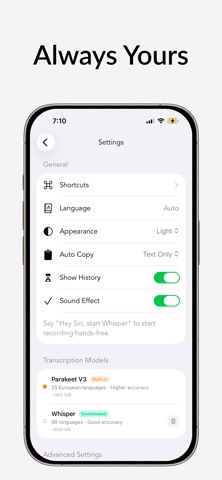
- 101 languages, auto-detected (optimized for English), accurate even in noise and mixed languages—three models (Parakeet, Whisper, SenseVoice), switch freely
- Export as SRT, VTT, or TXT—timestamps and speaker labels included—or auto-save every new transcript to Files or iCloud Drive
■ Privacy & Speed
Because everything runs on your device, there is nothing to upload—and nothing to leak. Turn on airplane mode before you record and leave it on: Whisper Notes works exactly the same. That matters when the recording is an interview, a client meeting, or something you would never put on someone else's server.
Transcribing 5 minutes of audio on iPhone 15: ~18 seconds with Parakeet, ~1 minute with Whisper. SenseVoice is much faster than Whisper and strongest for Chinese, Japanese, and Korean. Each model has its strengths—choose freely based on language and use case. Older devices are slower but work fine.
■ Honest Pricing
Because transcription runs on your device, we have no server costs—so there is nothing to charge you monthly for. Most similar apps charge $100+/year; we charge once.
No subscriptions, no in-app purchases, no ads.
Not satisfied? Tap Settings → Request Refund.
■ Common Questions
Does it work completely offline?
Yes. Your audio never leaves your device. Works on flights, in remote areas, anywhere.
Can I transcribe WhatsApp voice messages or videos?
Yes. Share or save audio/video from WhatsApp to Whisper Notes and transcribe offline. Perfect for extracting subtitles without uploading to cloud services.
Is there a recording time limit?
Up to 24 hours per recording, and hours-long recordings transcribe on every supported iPhone. Longer recordings just take more time.
Does it support real-time transcription while recording?
Not during recording, but yes during transcription—after you finish recording, you'll see the transcript appear in real-time as it's being generated.
Do you support speaker labels (diarization)?
Yes—fully offline. Tap ⋯ on a note → Detect Speakers, then rename each speaker.
Where is my data stored?
Only on your device. We have zero access. Note: If you delete the app, your recordings are deleted too (because we don't keep secret backups). Please export important files regularly.
Can I summarize a transcript?
Yes — copy it into whichever AI tool you prefer. Whisper Notes itself never uploads anything; your audio and text stay on your device.
What if I switch apps while transcribing?
iOS limits background processing, so transcription pauses and continues automatically when you come back.
Which devices are recommended?
iPhone 12 and newer. Older devices (iPhone 11, iPhone SE 2nd gen) are not recommended—the app will not function properly on these devices.
What languages are supported?
English, Español, Français, Deutsch, Português, Italiano, Nederlands, 简体中文, 繁體中文, 日本語, 한국어, Hindi, Arabic, Русский, Türkçe, Polski, Українська, Tiếng Việt, Thai, Tagalog, Bahasa Indonesia, Svenska, Norsk, Dansk, Suomi, Čeština, Greek, Hebrew, Română, Magyar, Persian, Urdu, and 65+ more languages.
■ Contact
Questions? Email [email protected]
Learn more: whispernotes.app