
iPhone Screenshots


Description
A qualifying ACDSee Photo Studio subscription is required. Get access to the full product FREE for 7 DAYS before incurring the annual subscription fee.
Whether you’re just starting your creative journey or have already mapped out a professional path, ACDSee Photo Studio is your trusty sidekick. Designed for photographers and digital explorers alike, this all-in-one software gives you AI-powered digital asset management to effortlessly navigate and organize your photo collections, as well as a full toolkit of non-destructive photo editing features to enhance every shot.
What's possible with ACDSee Photo Studio?
Unrivaled Digital Asset Management
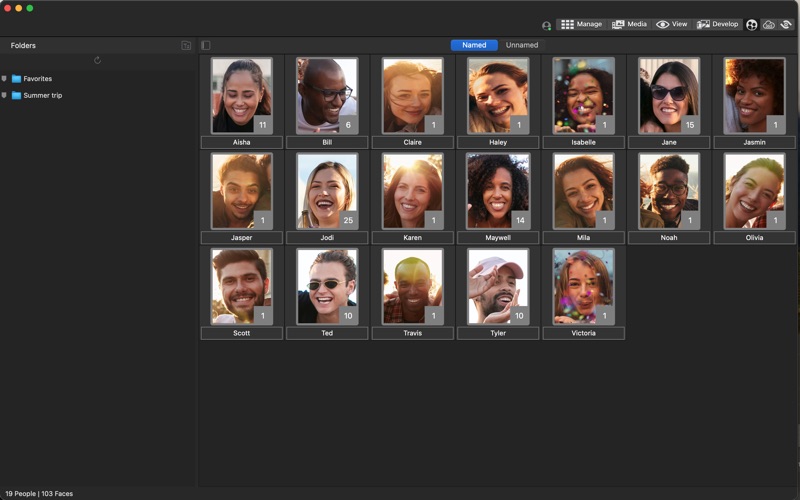
Finding, sorting, moving, organizing, and sharing—everything you need for complete mastery over your photography workflow is right here, at your fingertips. No uploading or importing of images needed. Add ratings, hierarchical keywords, tags, categories, location data and customizable color labels to your files for easy sorting. Manage the people in your photos and search by person to effortlessly recall special moments.
ACDSee AI Super-Resolution - Transform Pixels into Perfection
AI Super-Resolution intelligently upscales images while reducing noise and blurriness, eliminating artifacts, and maintaining details. It improves contrast and sharpness, resulting in clearer, more detailed upscaled images.
Non-Destructive AI RAW Photo Editing
Set out on a creative journey with intuitive, non-destructive RAW photo editing at your fingertips. Whether you’re capturing the colors of the beach at sunset or restoring the memories of a well-traveled photograph, tools like Color & Tone Wheels or Color EQ give you full control over every pixel.
Next Gen Non-Destructive AI Selection Masks
With AI Select Subject, AI Select Background, AI Select Sky and AI Object Selection Tool.
A View to Remember
Use View Mode to display images in full resolution, one at a time. You can view image properties, display areas of an image at varying magnifications, or rotate images. Use the Show Original button to preview image Snapshots.
Features
AI Face Detection & Facial Recognition
The Face Detection & Facial Recognition tool will find the humans in your photographs so you can name them for quick searching. ACDSee will immediately learn which names to put to which faces and suggest possible matches when needed.
Add Ratings and Labels
Add ratings and labels by dragging and dropping or with one click, by checking a checkbox.
Keyword Management
ACDSee comes pre-loaded with a variety of usable keyword sets. You can also create sets of related categories and switch between them.
Duplicate Finder
Find duplicates across a variety of folders and locations. Rename or delete detected duplicates to keep your file collection under control.
Batch Tools
Efficiently modify multiple files at once and automate tasks that you frequently do, such as renaming files with your last name or converting your images to another file format.
ACDSee AI Super-Resolution
AI Selection Masks
AI Select Subject, AI Select Background, AI Select Sky and AI Object Selection Tool.
Color Wheel
Select a range of colors using the Color Wheel and completely change the Hue, Saturation, Brightness, and Contrast.
Tone Wheels
User-friendly tone wheels make split-toning highlights, midtones, and shadows easy.
Skin Tune
Use the Skin Tune tool to even tone and restore glow in your subjects, as well as brighten and smooth.
Clone Repair Tool
Remove image flaws using the Cloning Brush for strong, simple textures or uniform colors.
Heal Repair Tool
Remove image flaws using the Healing Brush on complicated textures like skin or fur.
Smart Brush
By selecting pixels based on color, brightness, or a combination of the two, the Smart Brush helps you select the precise area for edits.
Develop Brush Tool
Brush on exposure, saturation, fill light, contrast, and clarity adjustments in parts of your image without affecting others.
And much more!