
iPhone Screenshots



Description
The app adds and edits subtitle tracks within video files. It supports multiple languages and allows for on/off toggling of subtitles without re-encoding video or audio.
Subtitle Factory is a simple and intuitive app for adding and editing subtitles in video files (MOV, M4V or MP4). It saves subtitle data directly into video files — without burning subtitles into the image. This offers several advantages:
• Subtitles can be turned on or off
• Subtitles can be edited or removed even after saving
• Multiple subtitle languages can be included, allowing users to switch languages in supported video players.
Subtitle Factory does not re-encode video or audio data. Only subtitle data is updated, so there's no loss in video or audio quality, and saving is fast — even for long videos.
Subtitle Factory adds, edits, and saves subtitle tracks defined in the QuickTime/MP4 video file specification. These subtitle tracks are supported by many video players, allowing subtitles to display during playback, including:
• QuickTime Player
• Music and TV apps on Mac, iPhone, and iPad
• Other third-party video players that support the subtitle track defined in the QuickTime/MP4 specification
■ Key Features
• For each subtitle text:
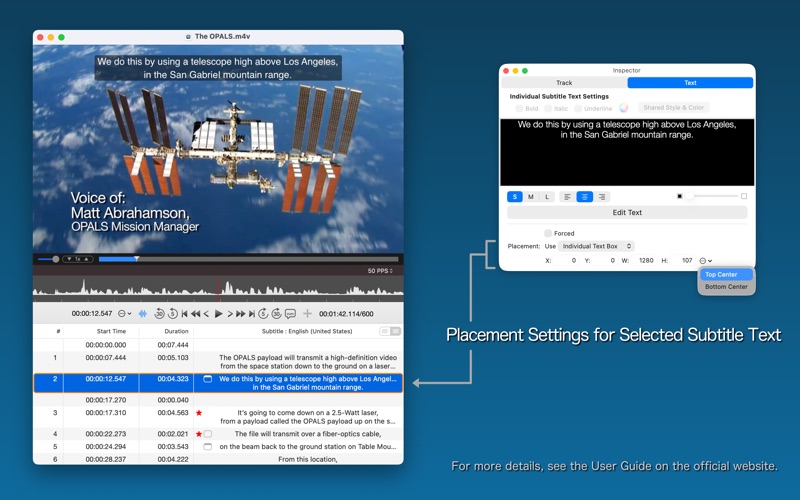
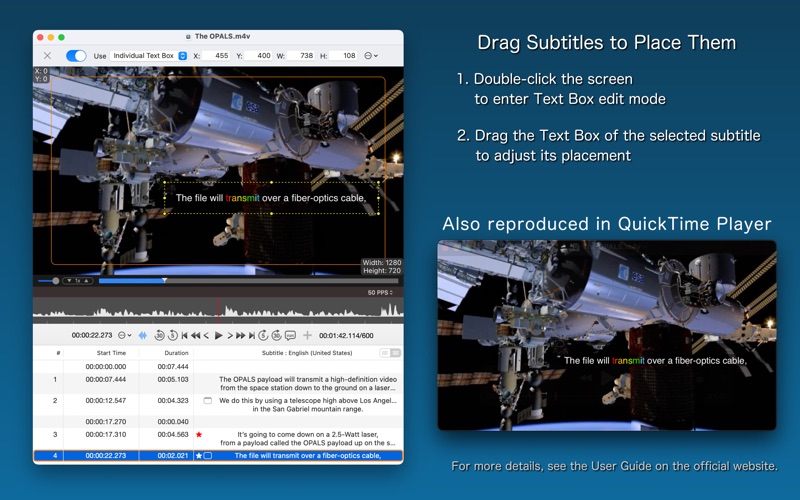
• Set text color, bold, underline, and italic styles
※ Note: Font and background color settings are not supported
• Adjust subtitle display position
• Create and edit separate subtitle tracks for different languages
• Import subtitles from .srt files
• Export subtitle data to .srt format
※ Note: You cannot directly open or edit .srt files
■ Supported Formats
• QuickTime movie (.mov)
• MP4 file (.mp4, .m4v)
But the app cannot open/play the following files.
• Files that QuickTime Player cannot open
• Files that require conversion or additional codec components to open in QuickTime Player
• DRM-protected files such as movies or TV shows downloaded from the iTunes Store or TV app
• Fragmented MP4
■ NOTE!
• Whether subtitle text styles (such as color and placement) are applied depends on the video player being used
• Closed Caption tracks are not supported
• As mentioned earlier, Subtitle Factory does not support burning subtitles into the video image
• Please make sure to back up your files before using this app, just in case an unexpected error occurs.
■ Sample Movie
Please visit the Subtitle Factory support website, where you can download a sample movie with English, French, German, Japanese, and Korean subtitle tracks created using Subtitle Factory. You can also check the user guide for more detailed information.