
Photo Journal: Collect
Photos, add notes, and share journals
Stuart Watson
iPhone Screenshots




Description
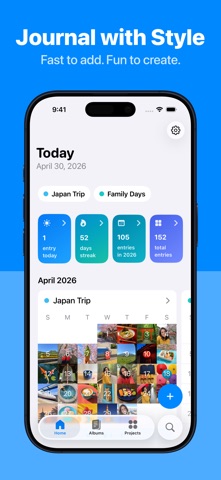
Create a daily journal by adding photos and notes. Organize entries into themed collections. Share journals via social media or email. Sync across devices and access offline. Edit photos with basic tools and add captions.
- Collect rich memories, not just photos -
- Easy, modern memory keeping -
- Complete your photo-a-day project -
'Collect' is the perfect personal photo journal!
----------------------------------------------
WHY? THESE AMAZING REVIEWS
"Love it! Downloaded a bunch of these photo journals. This one definitely beats them all."
"Favorite app on iPhone. The interface is simple and stylish, convenient, user-friendly.”
“Best… App… Ever. If you are a scrapbooker or memory keeper this is the perfect app."
----------------------------------------------
WHAT MAKES COLLECT DIFFERENT?
DATE & CAPTION YOUR PHOTOS
Beautiful, elegant design to show off your photos that also includes the date (month, day and year) and a caption.
CAPTIONS PLUS DETAILED NOTES
Sometimes a short caption isn't enough so with Collect you can add as much detail as you want with unlimited text notes entry with each photo.
ADD PHOTOS IN BULK
Get your important photos into the app quickly using the bulk import feature (up to 10 at one time).
USE TAGS TO SORT YOUR PHOTOS
Adding tags to each photo memory helps you filter and find them later.
MULTIPLE ALBUMS & CALENDARS
Create multiple different albums for whatever you're interested in.
AUTOMATIC BACKUP & SYNC
Enable fast syncing & private backup via your iCloud account.
CREATE & SHARE MONTHLY COLLAGES
Easily generate hi-resolution collages of your photos every single month.
PERFECT FOR PRINTING
The card format is perfect for printing when you export them from the app. Export your whole month of photos in bulk ready to print in either 3x4 or 4x5 print sizes.
CREATE VIDEO SLIDESHOWS
Want a super-easy way to share your photos & memories with friends & family? Then create video slideshows including dates & captions (ideal for Instagram, YouTube & Facebook).
PASSCODE LOCK (WITH FACE ID/TOUCH ID)
Keep your journal private by adding a passcode lock (with Face ID & Touch ID support).
NO SIGN-UP REQUIRED
Starting collecting your photo memories straight away. No account. Everything is private.
AND SO MUCH MORE...
- Add multiple photos every day
- Beautiful, intuitive design
- Fast, easy to use interface
- Daily reminders to add photos
----------------------------------------------
PRICING
Collect is free to install and try with a limit of 15 photo entries (with all features).
Upgrade to Collect Plus to add unlimited entries for the term of your membership (either monthly subscription or lifetime single purchase).
The subscription will automatically renew unless turned off in your iTunes Account Settings at least 24 hours before the current period ends. You can go to your iTunes Account settings to manage your subscription and turn off auto-renew. Your iTunes Account will be charged when the purchase is confirmed.
The lifetime upgrade is a one-time payment that provides all features with unlimited entries and doesn't renew.
Read Collect's privacy policy here: https://collectphoto.app/privacy
Read Collect's terms of service here: https://collectphoto.app/terms
----------------------------------------------
DOWNLOAD NOW. GET STARTED.
Save your best photos each day and 'Collect' a stunning photographic journal of your life.
https://collectphoto.app