
MediacomConnect
View bills, check outages, troubleshoot issues
Mediacom Communications Corporation
iPhone Screenshots




Description
Manage account details by viewing billing statements, paying bills, storing and modifying payment methods. Check for outages and troubleshoot issues directly from the . Access account information anytime without making a phone call.
The MediacomConnect MobileCare app is the next generation in customer service, giving you the freedom to access your account whenever and wherever without ever having to make a phone call. With just one click, you can view your bill, check for outages, troubleshoot, and so much more! Check out all of the MediacomConnect MobileCare features below:
Account & Billing
• View your current billing statement
• Pay your bill
• Store payment method on file
• Modify payment method on file
• Find a payment center
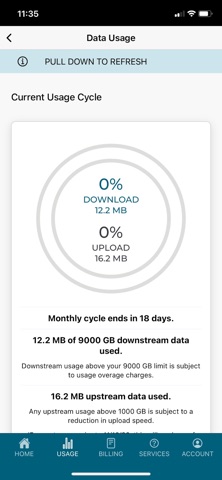
Internet Data Usage
• View current Internet service level
• View Internet Data Usage allowance
• Review Internet Data Usage history
Outage Check
• Check for service interruptions in your area for TV, Internet & Phone
Appointment Manager
• View upcoming service appointment
Technical Support
• Automatically refresh your modem or cable box to solve Internet or TV issues
• How-To's and FAQs for your TV, Internet, and Phone service
Notifications
• Upcoming service appointments
• Account updates
• Billing updates
• Bill due dates
Communications
• Chat with a customer service agent
• Enroll in Text Messaging
• Submit Customer feedback
• One-touch Connect-to-Agent dialing
Note: You must have an active Mediacom account to register for and use the MediacomConnect MobileCare app.