
Quick Fav Dial - Smart Dialer
Assign contacts to positions
Klaus Schöffmann
iPhone Screenshots





Description
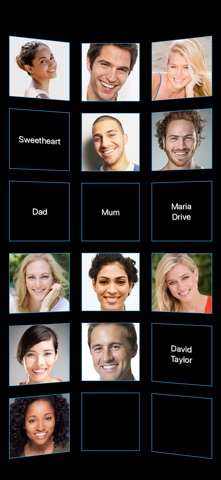
Assign contacts to positions 1-50 for access. Call, text, or WhatsApp with single or double taps. View contacts by photo, name, or nickname on a rotatable 3D interface. Supports FaceTime and email actions.
Call the people who matter with one tap on their photo — the beloved speed dial of classic mobile phones, reinvented for your iPhone.
Assign your favorite contacts to positions on a rotatable 3D wall and reach them instantly: call, text, WhatsApp, Signal, email or FaceTime.
• QUICK AND EASY
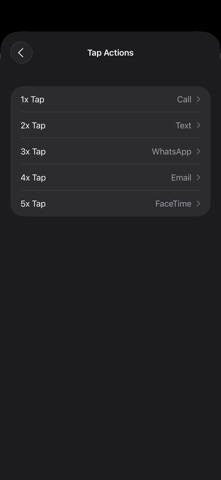
1x tap to call.
2x tap to text (SMS/iMessage).
3x tap to WhatsApp.
4x tap to email.
5x tap to FaceTime.
You can change what each tap count does in Settings (including Signal), or long-press a contact for a menu with all its actions. You can even make single contacts always use WhatsApp for calls.
• NO NUMBERS REQUIRED
The app reuses the contacts already stored on your iPhone — no retyping numbers, email addresses or photos. If you change a contact in the Contacts app, the wall updates automatically.
IMPORTANT: That is why Quick Fav Dial needs access to your contacts! Without access, the app cannot work and will forget all assignments after a restart (you can fix this later in your iPhone's Privacy settings).
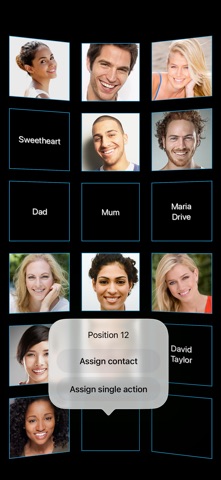
• ASSIGN SINGLE ACTION (NEW)
Dedicate a position to exactly one action — e.g. "always WhatsApp Grandma" — no matter how often you tap.
• UP TO 48 POSITIONS & 3D SCROLLING
Enough space to visually group family, friends and colleagues in their own areas. Fast horizontal 3D scrolling — now also in landscape.
• MULTIPLE ASSIGNMENTS
By default the app stores the first phone number and email address of a contact. Want a different one? Enable "manual field selection" in Settings or assign the same contact to a second position — the app will ask which number or email to use (email texting enables iMessage instead of SMS).
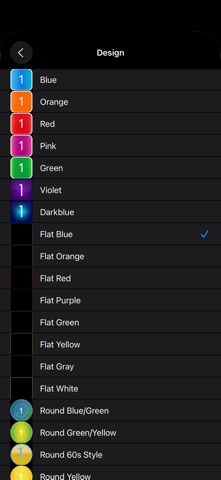
• COLOR THEMES & DARK MODE
Twenty-one designs to match the display to your style.
Prefer extra large photo buttons (e.g. for seniors or visual impairments)? Check out Quick Fav Dial XL.