Soundbeam
Visualize sound with real-time waveforms
PZ MOBILE LIMITED
iPhone Screenshots



Description
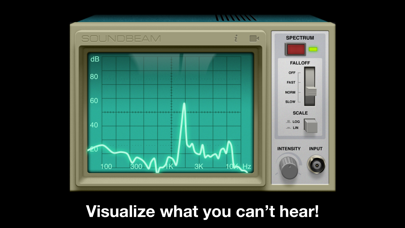
Visualizes audio signals in real time with a spectrum display. Connects to microphones or hi-Z devices via mini-jack. Measures sound frequency and amplitude. Adjusts visual settings for different sound sources. Displays real-time audio analysis data.
Soundbeam helps you see what everyday sounds look like and visualizes sounds you can't even hear!
Plug in your electric guitar, a mic or any other (hi-Z) device to your mini-jack input and get accurate measurements. You can always use the built-in mic.
We paired stylish controls and an old-school interface with high precision signal processing algorithms, creating a new way to experience sound.
Soundbeam is an real-time audio analyzer (RTA) that processes the input of your microphone displaying it like a classic oscilloscope. It also features a spectral visualization of the audio using high resolution fourier transform (FFT) for accurate measurements.
Get a dose of nostalgia with Soundbeam now!
Key Features:
* Spectrum and waveform views
* Recording functionality
* Gesture support for frequency range and intensity levels adjustment
* Visualization controls
* ...and one more thing! Plug in your headset or guitar and watch what happens!
Controls:
* While in "spectrum mode", pinch the monitor vertically or horizontally to change frequency range and intensity levels respectively. You can also pan the soundwave with one finger.
* In "waveform mode" pinch the screen vertically to adjust intensity levels.
* Double tap on the screen to reset view.
* Tap & slide the intensity knob horizontally to adjust it.