
iPhone Screenshots

Description
The app mirrors user folders to external drives, USB sticks, or NAS. It copies photos and music libraries into organized folders.
Simple, safe, one-way folder mirroring — with your Photos and Music libraries included.
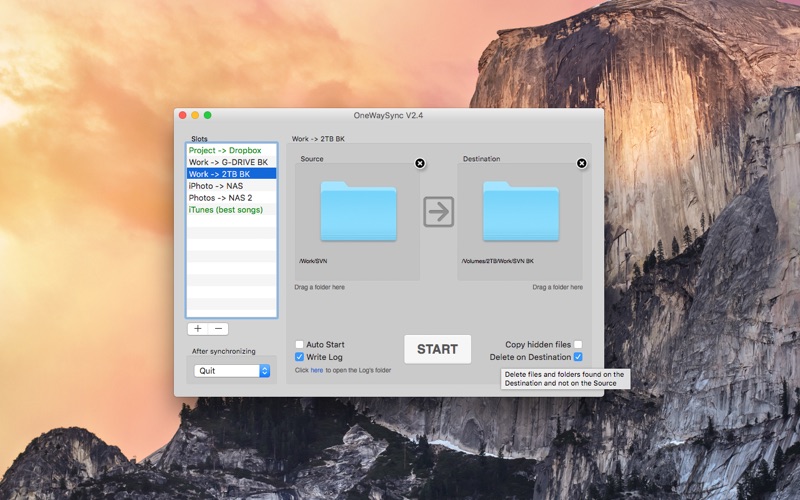
OneWaySync keeps exact mirrors of your folders on external drives, NAS, USB sticks or anywhere else. Synchronization is strictly one-way: the source is only ever read, and after the first copy only new and changed files are transferred. Drag a source, drag a destination, press START.
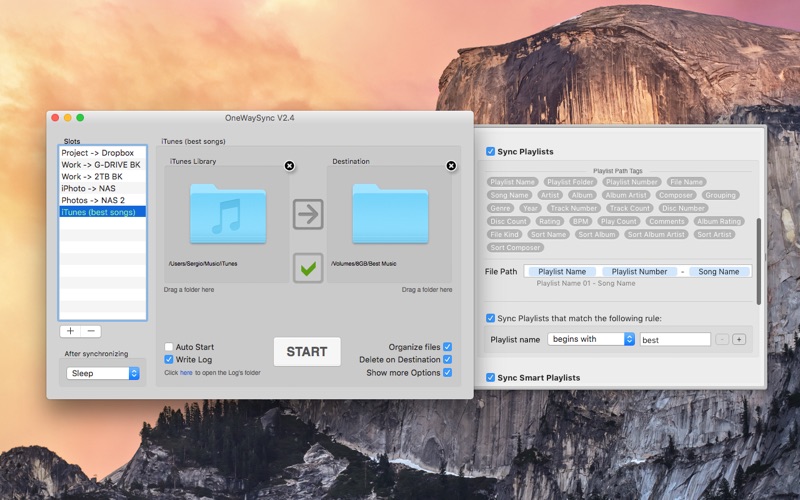
And it goes beyond folders: connect your Photos library or your Music library with one click, and OneWaySync copies your photos, videos and songs into plain, neatly organized folders — readable from Windows, TVs, media players and any backup tool.
FOLDERS
▪ As many sync setups as you want, each with its own folders and options.
▪ Optional mirror mode ("Delete on Destination") removes files you deleted from the source — or leave it off to keep everything ever copied.
▪ Mix several sources into one destination by pointing multiple setups at the same folder.
▪ Copies hidden files (optional) and Finder label colors.
▪ Follows folders even if they are renamed or moved.
PHOTOS AND MUSIC
▪ "Use Photos Library" copies your photos organized by date or by album — you design the folder and file names with simple tags.
▪ Copy edited photos or untouched originals, convert photos to JPEG, resize to a maximum size.
▪ "Use Music Library" exports songs, music videos and playlists — playlists become real folders.
▪ Filters choose exactly what gets copied.
▪ Old iPhoto and iTunes libraries from older Macs are still read directly.
SET IT AND FORGET IT
▪ Scheduled synchronizations: weekly, or repeating every few minutes.
▪ Queue setups to run one after another, or run them at the same time.
▪ Quit, sleep, shut down or run a custom script when everything finishes.
▪ Safe to cancel at any time — continue later from where it stopped.
▪ Every operation can be written to a log file.
▪ Fully scriptable with AppleScript.
FAQ
• Is my source folder or library ever changed?
Never. Sources are only read; files are copied out of them.
• What happens when I delete files at the source?
Your choice: with "Delete on Destination" enabled, their copies are removed on the next sync, keeping a perfect mirror. Leave it off to keep everything that was ever copied.
• My photos are in iCloud — does this work?
Yes. If "Optimize Mac Storage" is enabled, photos are downloaded automatically as they are copied.
• Is it safe to cancel an ongoing synchronization?
Yes, at any time. The next sync can continue right where it stopped.
OneWaySync requires macOS 11 or later.