
PBA Flex
Set your mobile password securely
Professional Benefit Administrators, Inc.
iPhone Screenshots
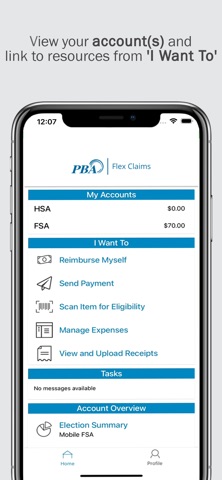


Description
Set up a mobile password using an ID number and a validation code. Enter the ID number from a PBA ID card as the username.
IMPORTANT PASSWORD SETUP INFORMATION
For added security PBA Flex Claims doesn't use your PBA Benefits Portal username and password. To setup your mobile password:
· Log into your PBA benefits portal account or create a new account.
· On the home page click “View FSA / HRA / HSA”.
· Once your flex portal home page has loaded hover over your name at the top of the screen and write down your Consumer Communication ID.
· Log out of both the flex portal and the benefits portal.
· Install the app and launch it on your mobile device.
· Type your Consumer Communication ID (or member ID number from your PBA ID card) into the username field.
· Type your mobile validation code (first initial, last 4 digits of SSN, and 2 letter abbreviation for the state you live in) in the password field. This contains no spaces and is all lower case.
· Follow the steps to set up your final mobile
password and 4-digit code.
If you need assistance with this app please contact PBA Mobile Support by phone or email at (630) 655-3755 or [email protected]. You can also view our “Getting Started with PBA Flex Claims” video at: https://youtu.be/5BxF0sR3Xrg?si=y7ajpCnaBEJKfwRJ
FEATURES AND TOOLS
* View your account balances and details 24/7
* Submit claims
* Submit receipts
* View account activity.
* View charts summarizing accounts
* No sensitive account information is ever stored on your mobile device
* View, contribute and distribute HSA transactions
* Pay bills from any account and add a payee
* Using the Dashboard, enter medical expense information and supporting documentation
* Retrieve your forgotten username/password
* Report a debit card as lost or stolen
Powered by WEX Health®