
TASUC Schedule
Create daily schedules with image cards.
Info Lounge Corporation
iPhone Screenshots
Description
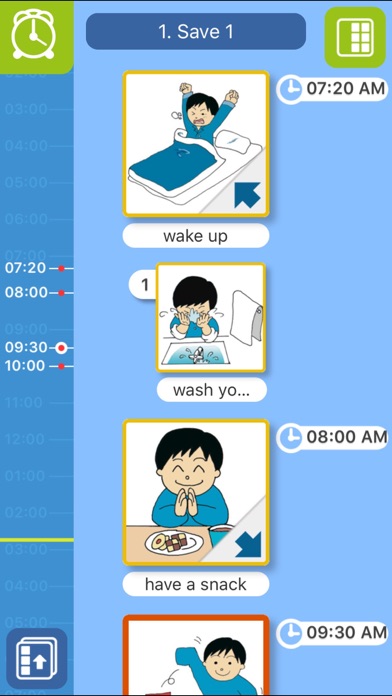
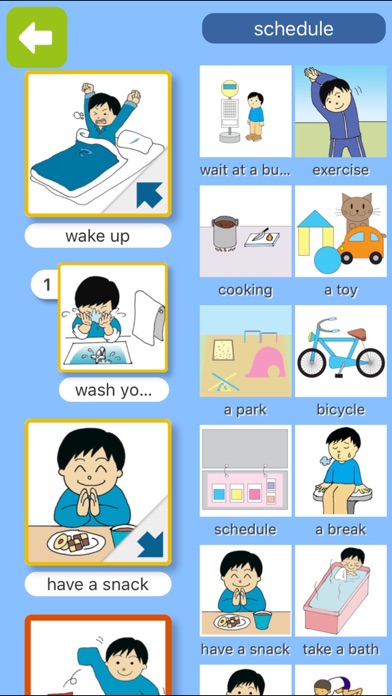
The app allows users to create daily schedules using image cards with attached sounds and voices. It is designed for children and adults to manage tasks in an organized manner through an intuitive interface.
TASUC SCHEDULE is a very simple, picture-based schedule application for iPhone/iPod touch, especially for small children to easily create his/her own daily time-table by using image cards with sounds & voices attached.
This application was, above all, developed for verbally disabled children and people with developmental disabilities such as autism, so that they can manage their "want-to-do"s simply and in order. As a result, an intuitive user interface and experience have been realized, thus this application can also be used for ordinary children and adults as well.
==============================
FUNCTIONS (as of ver1.2.0)
==============================
1. SCHEDULER
1-1. EDIT MODE
- Drag and drop a card from card-list to the canvas.
- Swipe a card to the left to delete it from canvas.
- Hold and drag a card set in canvas to reorder cards in the schedule.
1-2. CANVAS (DISPLAY) MODE
- Tap clock to set time.
- Tap status bar to scroll to the current time.
- Swipe a card left & right to set "complete".
- Tap a lower left button and then multi schedules will be editted.
- Long Click each schedules to copy&paste 'one schedule set'.
2. CARD LIST (CARD-EDIT & VOCA)
- Tap "Add Picture" button at upper-right corner of the screen to create a new card.
- Hold card for a while to start dragging & reordering. To move it to the other page, just drag it to the bottom tab.
- By locking cards from SETTINGS, you can use it as a verbal communication tool (VOCA).
3. OTHER SETTINGS
- Sound effects
- Card-List setting
- VOCA mode (card lock or scheduler lock)
- Schedule save data setting
- Alarm setting
- Clock format, card name display, data initialization, etc.