
iPhone Screenshots


Description
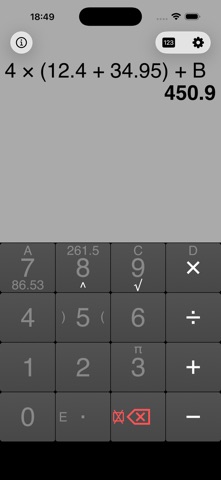
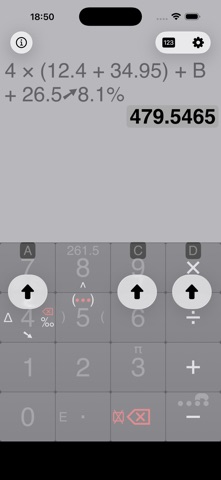
The app features large, easy-to-read keys for fast input and a permanent display of the user's expression. Results appear automatically as typing occurs, eliminating the need for an equals key.
FastCalc is a calculator recognized for its efficiency and ease of use.
It stands out thanks to:
• its large keys, which allow for fast and accurate input,
• the permanent display of the expression entered by the user,
• the automatic display of the result while typing: no “=” key required!
FastCalc is thus suitable both for everyday calculations and for more advanced use.
BASICS OF USE
The interface of FastCalc is innovative and minimalist, entirely based on simple gestures:
• Select a side symbol on a key: slide your finger in its direction.
• Delete the last entered elements: make a small swipe to the left on the display.
• Clear the entire expression: swipe quickly to the left across the whole display.
• Store a result in a memory: tap the result and choose the desired memory.
FEATURES
• Large, practical, and easy-to-read keys.
• Customizable constants.
• Advanced mode for percentage calculations.
• Permanent display of the current expression and temporary memories.
• Automatic storage of the previous result (ANS) each time an expression is cleared.
• Integrated help videos and user guide (in ⓘ).
SETTINGS
• Enable interface sounds and adjust their volume.
• Enable advanced mode.
• Choose the number of displayed decimals and the thousands separators.
• Customize the colors of the keypad and the expression.