
Moon Lunation
Moon phase geometry computed on device.
Siu Lun Corley Chan
iPhone Screenshots


Description
The app calculates the Moon's phase for any date between 2000 and 2050 using the geometry of the Sun, Earth, and Moon. It displays the current phase, illuminated percentage, and upcoming events in local time.
Moon Lunation shows you the Moon's phase for any date between 2000 and 2050 — computed on your device, from the actual geometry of the Sun, Earth and Moon.
Moon Lunation is free. No connection. No account. No data collected. No ads, ever — not even now that there's nothing to buy.
COMPLETELY REBUILT
The original 2009 version read its phase times from a fixed table and estimated the dates in between. This version solves the geometry directly, so every phase name, illuminated percentage, lunar age and event time is calculated for the exact moment you ask about.
The results are checked against NASA JPL's DE440 planetary ephemeris — the same reference used for spacecraft navigation.
TODAY
The current phase, the illuminated percentage, how far through the lunation you are, and when the next principal event falls in your local time.
CALENDAR
Any month from January 2000 to December 2050. New moons, first quarters, full moons and last quarters are marked on the local dates they actually occur. Tap any day to see its phase.
CYCLE
Watch a single lunation play out from one new moon to the next. The timeline runs between two actual computed new moons, so its length varies from cycle to cycle — it is not forced to the average of 29.5 days. Scrub it with your finger, or play it through in fifteen seconds.
SOLAR SYSTEM, WITH MOON LUNATION PRO
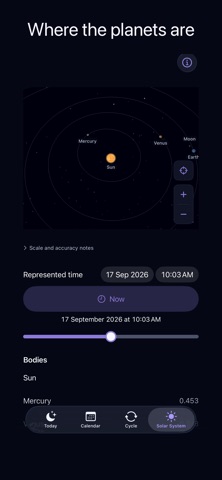
See the Sun, Mercury, Venus, Earth, the Moon and Mars in 3D, placed by the same offline astronomy the rest of the app uses. On Mac, all eight planets are drawn, out to Neptune. Drag to orbit, pinch or scroll to zoom, tap a body to centre on it and read its distance from the Sun and from Earth. Scrub the timeline and watch the planets move along orbits traced from real positions.
The Solar System is unlocked by Moon Lunation Pro, a one-time in-app purchase — not a subscription. If you already paid for Lunation or Moon Lunation, on any device, before this update, it's yours automatically, at no charge. Family Sharing is on, so one purchase can cover your family.
NOW ON MAC
Moon Lunation is a native Mac app: a three-pane window with a sidebar and an inspector, full keyboard control, a menu-bar Moon that stays current while you work, and desktop widgets.
THE MOON ITSELF
The surface is built from Lunar Reconnaissance Orbiter imagery, reprojected into a fixed north-up view of the near side. The lit region is drawn from the computed phase, so what you see is the geometry, not an illustration of it.
WHAT IT DOESN'T DO
Being clear about the edges:
• It covers 1 January 2000 to 31 December 2050. Outside that range it tells you so rather than guessing.
• It is a north-up diagram of the phase, not a picture of how the Moon looks in your sky tonight. The real Moon appears rotated depending on where you are, and this app does not represent that rotation.
• It does not show libration, the Moon's slight apparent wobble.
• It does not predict eclipses. Phases come from changing Sun–Earth–Moon geometry, not from Earth's shadow — eclipses are separate events.
• Times are geocentric, calculated for the Earth as a whole rather than for your location. There is no location feature and no city list.
• It does not show moonrise or moonset.
PRIVACY
This app makes no network requests of its own. There is no analytics, no crash reporting, no advertising, no tracking, and no account system. It does not ask for your location. It stores no personal data and writes nothing about you to disk. Purchases and Restore Purchases are handled entirely by Apple.
It works in Airplane Mode, on the first launch and every launch after.
iPhone, iPad and Mac. Requires iOS 17, iPadOS 17, or macOS 14 or later.
Lunar surface imagery courtesy of NASA's Scientific Visualization Studio. NASA does not endorse this app.