
iSeismometer
Ground motion recording and analysis instrument.
ObjectGraph LLC
iPhone Screenshots


Description
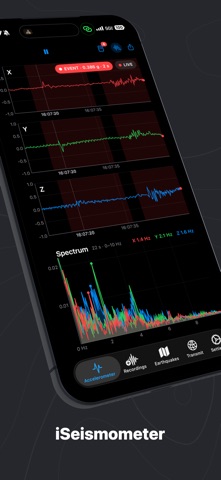
The app transforms a phone into a seismograph, recording ground motion across three axes at high sample rates. It offers event detection, historical data browsing, and the ability to export recordings.
iSeismometer turns your iPhone or iPad into a seismograph. Set it on a table, tap the desk, and watch the ground move. You will be surprised how sensitive your phone is.
It has been doing that since the App Store opened in 2008, when it reached #1 in Education in Japan, Austria, Finland, and Greece. Version 1.7 is a complete rebuild: faster, clearer, and finally a real instrument.
LIVE SEISMOGRAPH
• Three axes at up to 100 samples per second, drawn like a strip-chart recorder
• Scroll back through up to an hour of history while it keeps recording
• Gravity filter with a real corner frequency, so slow tilt disappears and earthquakes stay
• Live spectrum: see the frequency of footsteps, a washing machine, or a passing truck at a glance
• Dark mode and a full iPad layout
EVENT DETECTION
• A seismologist's STA/LTA trigger flags every tremor with its peak acceleration, duration, and dominant frequency
• Three sensitivity levels, from "only real shakes" to "every footstep"
• Events are shaded on the traces and listed so you can jump straight to them
RECORDINGS
• Every session is saved automatically as compact raw data, split into hourly files
• Browse by day, open any recording, scrub to its events, and see its spectrum
• Export CSV, or pick up the raw files in the Files app and in Finder
• Keep them for a day, a week, a month, or forever
WAS THAT AN EARTHQUAKE?
• Live USGS feed on a globe, filtered by time window and magnitude
• Tap a quake for its depth, time, and the official USGS page
STREAM TO YOUR MAC
• Open iSeismometer on a Mac on the same Wi-Fi and your phone finds it by itself
• The Mac shows every device streaming to it side by side, with its own recordings and event detection
• Reconnects on its own after the screen locks, the network drops, or the Mac restarts
Made for fun and for learning. A phone carries a MEMS accelerometer, not a broadband seismometer, so it feels footsteps and trucks far better than distant earthquakes. Put it on a solid floor, plug it in, keep the screen awake, and you have a home seismic station.
Questions and ideas: [email protected]
"This is a novelty app but one that also helps you learn something new... one of those things that is very captivating once you've looked at it once." — The Independent Guide to the iPhone 3GS