
iPhone Screenshots

Description
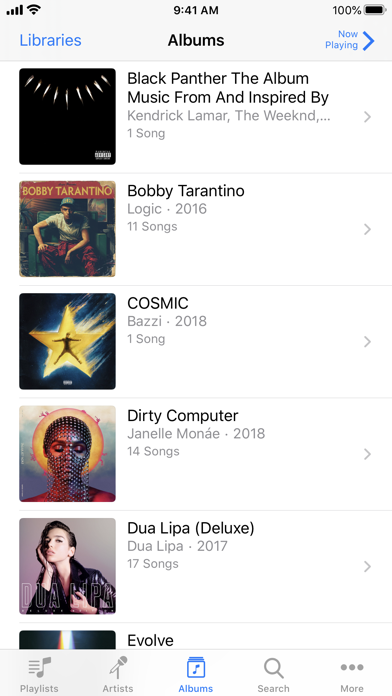
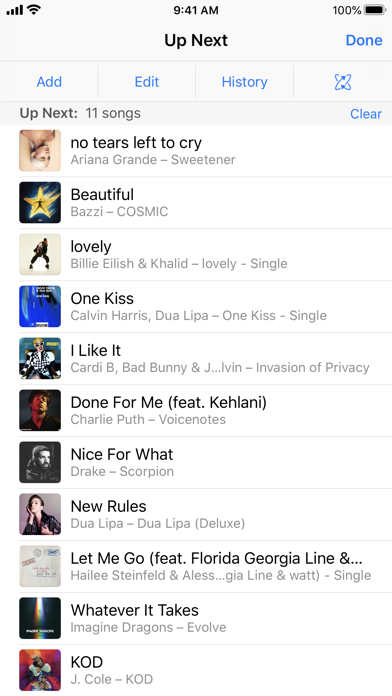
Control Apple Music, , or Apple TV from an iPhone or iPad. Browse music, movies, and podcasts. Create and edit playlists. View upcoming songs. Search your entire library. Connect directly to Mac or PC.
iTunes Remote is the best way to control Apple Music, iTunes, or the Apple TV app from anywhere in your home. Simply download the app to your iPhone or iPad, and connect directly to Apple Music, iTunes, or the Apple TV app on your Mac or PC.
With iTunes Remote you can:
• Access your Apple Music, Apple TV, or iTunes libraries
• Browse music by artist, albums, and songs
• Browse movies, TV shows, and podcasts
• Create and edit playlists
• See upcoming songs with Up Next
• Search your entire Apple Music, Apple TV, or iTunes libraries
• Explore shared Apple Music, Apple TV, or iTunes libraries
• Listen with AirPlay
• Send music to AirPlay speakers
• Group speakers together to play music in multiple rooms at the same time
• Set the volume on each speaker independently
Requirements:
• iPhone, iPad, or iPod touch with iOS 11.4 or later
• Wi-Fi connection to Apple TV, Apple Music, or iTunes on a Mac or PC
• macOS 10.15.2 or higher for Apple Music and the Apple TV app
• iTunes 12.8 or later is recommended for use with iTunes Remote