
iPhone Screenshots



Description
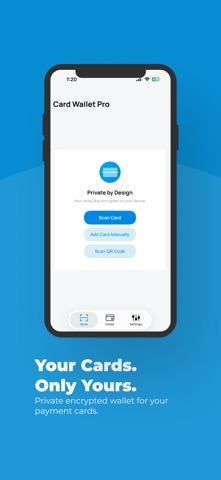
Scan your cards, keep their details organized and save time filling payment forms. Use AutoFill and the Safari extension to fill saved card details in compatible fields without retyping them.
Add credit and debit cards with your iPhone camera, enter details manually or scan supported contactless cards with NFC in supported regions.
One purchase. No ads. No subscriptions. No account required.
LESS TYPING WITH AUTOFILL & SAFARI
Put your saved cards to use when shopping online.
• Use the AutoFill extension to fill saved card details in compatible fields.
• Use the Safari extension to fill supported payment forms while browsing.
• Keep quick copy available whenever you need to enter a detail manually.
Enable the extensions in your device settings before using them. Supported fields and filling behavior depend on the app or website.
SCAN CARDS WITH YOUR CAMERA
Use your iPhone camera and text recognition (OCR) to capture card details. Review and edit the information before saving, or add a card manually.
NFC CARD SCANNING - EU ONLY
Hold a supported contactless payment card near your iPhone to read the card information it makes available.
NFC card scanning requires a compatible iPhone and iOS version, an Apple Account registered in the European Union and a device physically located within the EU.
Supported cards and readable information vary by card and issuer. Some cards may also provide recent transaction information through NFC. This is not a live bank statement or a complete transaction history.
Reading a card does not enable contactless payments with your iPhone.
YOUR CARDS, ORGANIZED
Keep credit and debit card details together in one convenient wallet. Customize cards with colors and notes, and quickly access or copy the information you need.
FACE ID & PIN PROTECTION
Protect access to your wallet with Face ID or PIN. Saved card information is stored on your device. No account is required.
When you use AutoFill or the Safari extension, the card details you choose to fill are provided to the selected app or website.
EXPIRATION REMINDERS
Get notified before a saved card expires so you can keep its information up to date.
EMERGENCY CONTACTS
Save contact details for your card issuers and quickly find the right number if a card is lost or stolen.
OPTIONAL CARD SHARING
Share supported card information between your devices and platforms using a QR code or link.
MORE CONVENIENCE
• Manual card entry and editing
• Quick copy of saved card details
• Optional automatic clipboard copy after scanning
• Card colors and notes
• QR code and link sharing
ONE PURCHASE. NO RECURRING FEES.
Camera scanning, card organization, AutoFill and the Safari extension are included in one purchase. NFC scanning is included where supported.
NFC card scanning is restricted to eligible users and devices within the European Union. AutoFill and Safari filling require the relevant extensions to be enabled and compatible forms.