
iPhone Screenshots
Description
Lightning for XcodeLightning for Xcode is an Xcode developer plugin that improves development efficiency for iOS and Mac developers.
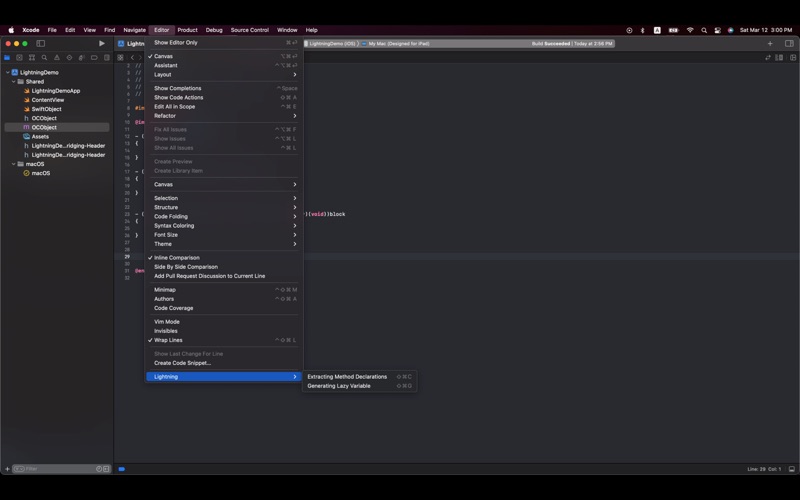
Lightning for Xcode has the following features:
- Extracting Method Declarations
Copy the implementation of a function and extract its method declaration.
- Generating Lazy Variable
Copy a property declaration and generate a lazy variable implementation.
- Defined Access Control
Add access control modifiers to the selected code.
- Generate Comment
Select code and insert an AI-generated comment using Apple Foundation Models.
(Requires macOS 26 or later with Apple Intelligence enabled.)
To install Lightning for Xcode in Xcode:
1. Quit Xcode;
2. Enable the Lightning extension in System Settings → Extensions → Xcode Source Editor;
3. Restart Xcode;
4. Select the code you want to process;
5. Use Xcode → Editor → Lightning menu;
6. Enjoy coding!
Tips:
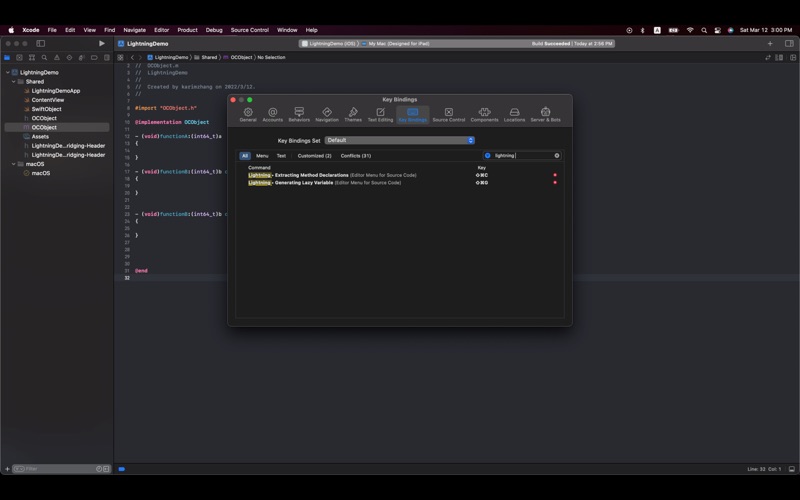
You can set a shortcut (Key Binding) for any command via
Xcode → Preferences → Key Bindings.
If you have any questions, please feel free to contact me at: [email protected]
If you have any questions, please feel free to contact me at: [email protected]