
Inventory Management-Scanoid
Scan barcodes, track , manage stock
Hyeonmyeong Ji
iPhone Screenshots



Description
Manage by scanning barcodes for receipts, warehousing, shipments, and adjustments. Register product masters and customers to track movements. View stock levels and manage transactions through barcode scanning.
Camera barcode scanning inventory management
※ Changed from paid to free.
- Ads will be displayed at the bottom, and they will be removed if you switch to the paid version.
■ How to use
1. Product Master Registration
2. Customer (purchase/sales place) registration
3. Warehousing and shipping can be used after registering the product master and customer.
■ Inventory management
-Receipt, warehousing return, release, shipment return, inventory adjustment
(When scanning the barcode, the product's current stock and inventory storage location information are also displayed)
-Past date data can be changed
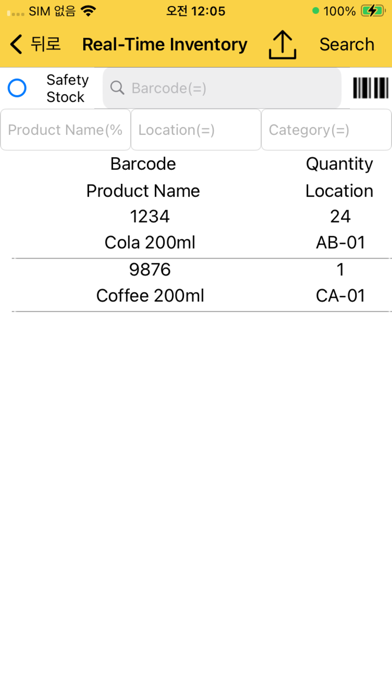
-Current Inventory: Real-time inventory inquiry
-Inventory by date: Inventory inquiry by date
-Billing receipt: Inquiry by date of basic inventory, stocking, warehousing return, delivery, shipment return, inventory adjustment, and end stock data
■ Barcode Scanner
-Scan the barcode with the smartphone's camera to change the quantity on the same screen
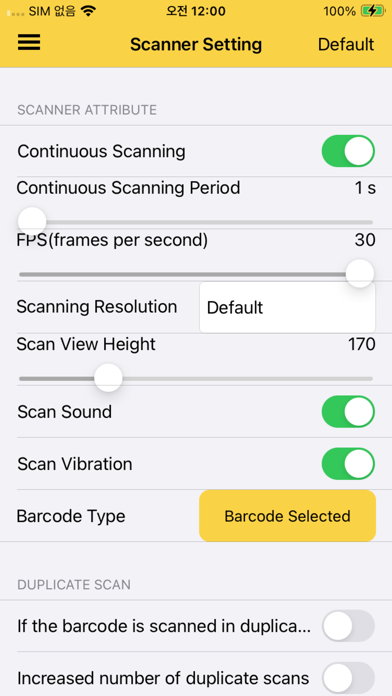
-Support continuous scan, single scan
-Continuous scan specifies the scan interval time
-Increase quantity and support line addition mode for duplicate scans
-Accurate barcode scanning by changing the scan area in real time
-Camera zoom in/out
-Supports optimal barcode scanning function by selecting camera lens
[Terms of Use]
https://www.apple.com/legal/internet-services/itunes/dev/stdeula/
[Privacy Policy]
https://blog.naver.com/gwise/222703219470