
iPhone Screenshots



Description
This is a simple camera app that displays the color information of what you want to know.
With your smartphone's camera, you can instantly identify the color of the subject in real time.
It’s recommended for those who want to identify colors, as well as individuals with color vision deficiencies (such as color blindness).
* How to Use
Launch the app when you find a color you'd like to identify.
Once the app is open, point the camera at the subject.
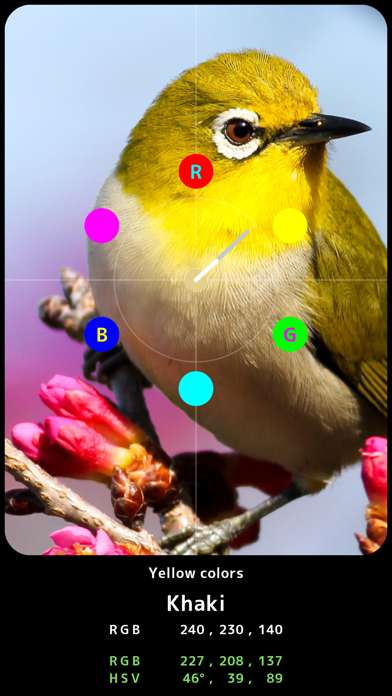
The color will be measured, and the name of the color along with its components will be displayed at the bottom of the screen.
* Color Meter
A meter will be displayed in the center of the screen.
The direction of the needle shows the hue of the color.
The meaning of the letters on the color wheel is as follows:
R (Red)
Y (Yellow)
G (Green)
C (Cyan)
B (Blue)
M (Magenta)
* Color Name
You can discover both basic colors and web colors. The color difference is calculated using the CIEDE2000 method.
* Color Components
CIELAB: Measures Lightness and the components (Red, Green, Blue, Yellow).
HSV Color Space: Measures Hue, Saturation, and Value.
CMYK: Measures the components used in printing - Cyan, Magenta, Yellow, Black.
RGB: Measures the components of the three primary light colors - Red, Green, Blue.