
iPhone Screenshots


Description
Halo Smart IoT is a powerful yet affordable platform for monitoring buildings, equipment, and connected devices. Designed for facilities, estates, engineers, and smart building professionals, Halo provides real-time insight into all your IoT gateways, sensors, and systems from one easy-to-use mobile app.
Whether you manage a single site or a large multi-location portfolio, Halo gives you the tools to track performance, view histories, detect issues early, and control your IoT devices remotely. Built with modern smart-building standards and compatible with Tridium Niagara 4 environments, Halo is ideal for BMS, HVAC, and energy monitoring applications.
Manage Gateways and Sites
• Add and configure IoT gateways
• Monitor multiple sites from a single interface
• View gateway status, connection information, and device health
Connect and Control IoT Devices
• Add sensors, meters, thermostats, plugs, and virtual devices
• Trigger device functions such as switching outputs or adjusting temperatures
• View device permissions, battery levels, signal strength, and connection type
Real-Time Dashboards
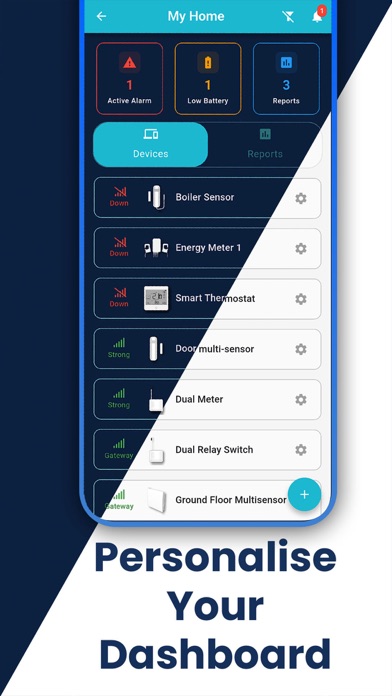
• View all sensor readings in a clean, intuitive dashboard
• Monitor temperature, humidity, energy, power, battery, occupancy and more
• Smart building-focused visualisations and status indicators
Historical Data and Analytics
• Access detailed charts for every device
• Improved graph reliability, readable timestamps, and upgraded loading states
• Analyse long-term trends for smarter decision-making
Alerts and Notifications
• View alerts across all sites in a consolidated overview
• Faster updates, clearer indicators, and improved alert cards
• Native push notifications with enhanced reliability
Smart Building & BMS Integrations
• Ideal for building management systems (BMS)
• Enhanced compatibility for Tridium and Niagara 4 environments
• Supports professional remote monitoring, maintenance, and diagnostics
Modern, Intuitive Interface
• Refreshed UI with improved styling, icons, themes, and layouts
• Light mode enhancements and clearer navigation drawers
• Faster loading, better transitions, and cleaner dashboards