
iPhone Screenshots


Description
File Multi Tool 7 is the ultimate photo date changer and file attribute editor for the Mac: batch-correct EXIF shooting dates, change file creation and modification dates, edit or strip metadata, and fix Finder sorting for thousands of photos, videos and files at once — natively on your Mac, without uploading anything to a website.
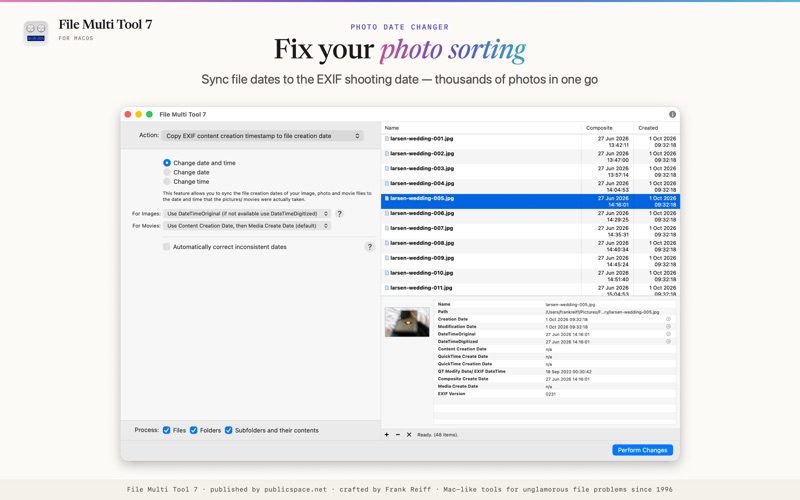
FIX FINDER SORTING FOR PHOTOS & VIDEOS
Synchronize file creation and modification dates with the EXIF shooting date so that your photos and videos sort correctly in the Finder, in Photos and in any other software.
CHANGE THE DATE A PHOTO WAS TAKEN
Correct EXIF shooting timestamps (DateTimeOriginal, DateTimeDigitized) and video creation dates for JPEG, HEIC, RAW and movie files. Set them to a specific date and time, or shift them by adding or removing time — perfect for fixing an incorrectly set camera clock or compensating for timezone changes.
REMOVE EXIF, GPS & IPTC METADATA
Strip all EXIF, GPS & IPTC metadata from a file before sharing it, remove only GPS and IPTC location tags, or change individual tags. Edit the most common EXIF & IPTC fields: copyright and owner information, camera and lens details, exposure information and much more.
TOTAL FILE DATE CONTROL
Set file creation and modification dates to specific values, add or remove time, or remove them altogether.
USE DATES EMBEDDED IN FILE NAMES
Extract dates embedded in file names — scans, messenger images, screenshots — and use them to set the various file dates. Highly flexible and configurable.
COPY DATES FROM ORIGINAL FILES
Many image and video editors lose your metadata. As long as you keep the originals around, File Multi Tool can transfer file dates from your original files to the processed files of the same name in a different folder hierarchy.
ADD DATES TO SCANNED PHOTOS
Scanned photos often have no date information at all. Start from an approximate date & time and add a small increment for each successive file, so that your scans show up in the correct order in Photos and other image managers.
SET MAC FILE FLAGS, SHOW & DELETE INVISIBLE FILES
Batch lock or unlock files, show or hide file extensions, set Finder labels and force Finder updates. Show invisible files in the Finder and delete invisible files such as .DS_Store that cause problems on non-Mac systems.
File Multi Tool is made by publicspace.net, creators of professional Mac file management and productivity tools since 1996.