
iPhone Screenshots


Description
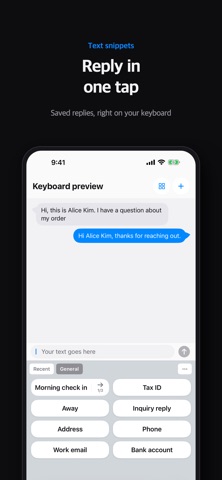
Stop typing the same thing over and over. Save it once, then it is one tap.
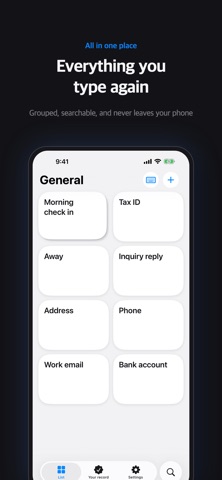
Keep the account numbers, addresses, introductions and email openers you reuse as snippets. In Messages, Mail, Safari, anywhere you can type, switch to ClipKeyboard, tap once, and the text lands in the field.
What it does
Snippets: what you saved goes in exactly as it is. One tap.
Templates: leave the parts that change as blanks, then fill them from values you already saved.
Stacks: keep several values in one place and send them in order, or switch between them with the arrow.
Secure snippets: lock passport and card numbers behind Face ID and open them only when you need them.
Smart clipboard: what you copy is sorted for you. It recognizes emails, phone numbers, addresses, card numbers and IBANs, so you find them again in a second.
Text recognition: photograph a card or a document, swipe over the part you want, and only that text becomes a value.
iCloud backup: it survives a new phone, image snippets included.
Please know this first
This is a keyboard for putting saved text in. It does not replace the keyboard you type on. Switch to it when you need to drop something in, then switch back.
Privacy
What you write stays on your device. If you turn on iCloud backup, it is stored encrypted in your own iCloud. We do not collect the contents of your snippets and we use no third-party analytics.
Free and Pro
Every feature is free until you have inserted snippets 100 times. After that, everything you made keeps working; the free limits apply only to new items. Pro removes every limit, as a one-time purchase or a yearly subscription.
Works on iPhone and iPad. Available in English, Korean, Japanese, Chinese (Simplified and Traditional), Russian, Spanish, German, French, Italian, Portuguese (Brazil), Dutch, Polish, Czech, Greek, Turkish, Indonesian, Swedish, Danish, Norwegian, Finnish, Thai and Vietnamese.
Contact: [email protected]
User guide: https://m1zz.github.io/ClipKeyboard/tutorial.html?lang=en
Terms of Use: https://m1zz.github.io/ClipKeyboard/terms.html?lang=en