
iPhone Screenshots


Description
Make a digital business card in under a minute, and hand it to anyone.
Fill in your name and number, pick a design, and you have a card. Everything else is optional, so a card with two lines on it looks as deliberate as a card with ten.
A CARD YOU CAN ACTUALLY USE
Every detail on a received card is live. Tap the phone number to call it, the address to open it in Maps, the email to write, the website to visit. One tap saves the whole card to your Contacts.
THREE WAYS TO HAND IT OVER
Show your QR code and let them scan it. Send a link in any app, which opens as a real card even for people who do not have this one installed. Or AirDrop it, and it arrives on the other phone as a contact they can save.
You can also scan someone else's code, and their card drops straight into your holder.
YOUR CARDS AND THEIR CARDS, KEPT APART
Cards you made and cards you were given live in separate places, so your own card is never buried under everyone else's.
MAKE IT LOOK LIKE YOU
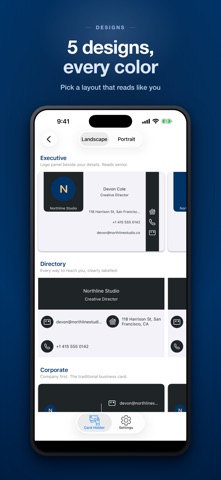
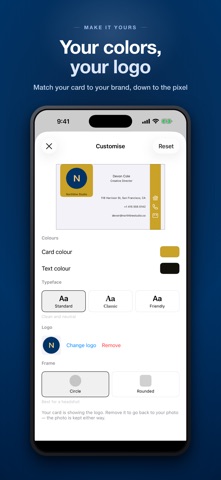
Choose from ready made layouts in landscape or portrait, then set your own colors, pick a typeface, add your logo, and cut your photo to a circle or a soft square.
ON YOUR HOME SCREEN
Put your card on the Home Screen as a widget, so handing it over is one tap from anywhere.
PRIVATE BY DESIGN
Your cards are stored on your device. There is no account, no sign up, and nothing is uploaded to us. A shared link carries the card inside the link itself, so even sharing does not send it through a server. You can lock the app with Face ID.
Free to use. An optional one-time purchase removes ads and adds custom colors, typefaces, logos and NFC tag writing.
Privacy Policy: https://umitkaya.com/products/privacy-policy-dbc-cards
Terms of Use: https://www.apple.com/legal/internet-services/itunes/dev/stdeula/
Questions? Reach us at [email protected]