
iPhone Screenshots



Description
Stop running in and out of the door to check the level. Caravan Leveler turns your iPhone into a levelling sensor that tells you exactly what to do: which side to raise, which end, and by how many centimetres — then lets you read it from wherever you are standing.
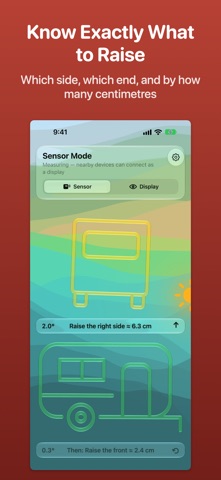
KNOW EXACTLY WHAT TO RAISE
- Front and side silhouettes of your vehicle tilt in real time, with the angle to a tenth of a degree
- Plain instructions: "Raise the right side ≈ 6.3 cm", then "Raise the front ≈ 2.4 cm"
- Side to side first, then front to back — the order that actually works
MADE FOR CARAVANS AND MOTORHOMES
- Caravan: wind the jockey wheel up or down and chock a side — the app says which way and how far
- Motorhome and autocamper: it knows you can only drive onto ramps, so it only ever asks you to raise, and names the wheels
- If the ground is too steep for any ramp, it says so instead of quoting a number no ramp can reach
- Air suspension? It reminds you to let it settle before you trust the reading
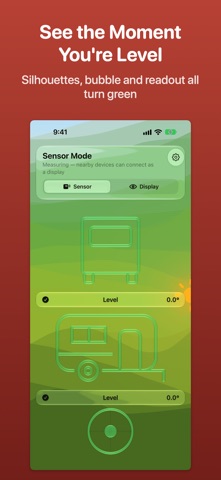
SEE THE MOMENT YOU'RE LEVEL
- Silhouettes, spirit-level bubble and readout all turn green when you get there
- Choose the silhouettes, the bubble, or both on one screen
- Drive-on guidance beeps faster as you approach level and chimes when you arrive, so your eyes can stay on the ramps. It ducks your music or radio instead of stopping it
READ IT FROM OUTSIDE
- Leave the sensor iPhone inside, flat on the floor or a worktop
- A second iPhone or iPad connects directly and shows the live level — no Wi-Fi, no internet, no account
- Or check it on your Apple Watch while you wind the steadies
- Your vehicle type and display choice follow along to every device automatically
MEASURE ONCE, RAISE EXACTLY
- Two quick tape-measure readings — between the wheels, and from the wheel to the front support or across the wheelbase — turn degrees into centimetres
- A visual guide shows exactly where to hold the tape
CALIBRATE ON ANY SURFACE
- If the surface under your iPhone isn't quite parallel to the chassis, level the vehicle once and hold to calibrate
- Reset it with a tap whenever you move the phone
AND A FEW MORE THINGS
- Sun direction: see where the sun is relative to your vehicle, and park for shade or solar
- Siri and Shortcuts: switch vehicle type, turn drive-on guidance on or off, change mode and calibrate by voice
- In English, Danish, German, Dutch, Norwegian and Swedish
Terms of Use (EULA): https://www.apple.com/legal/internet-services/itunes/dev/stdeula/