
Dual Messenger: Web Clone
Connect with friends across multiple accounts
Eyermin Colon Sanchez
iPhone Screenshots




Description
Manage multiple network accounts in one place. Learn to change phone numbers without losing messages. Disable automatic image downloads. Access guides for WhatsApp and other platforms. Simplify media management with step-by-step tips.
Open a second account on any chat app — without a second phone. Dual
Messenger lets you scan a web QR code from WhatsApp, Telegram, and
other apps to run a parallel session right inside this app, so you
can keep your personal and work chats separate on one device.
HOW IT WORKS
1. Open Dual Messenger and tap "Scan QR"
2. On your other device, open WhatsApp (or another supported app)
and go to the 3-dot menu > Linked Devices / Web
3. Point your camera at the QR code shown here
4. That's it — your second account is now linked and ready to use
WORKS WITH
WhatsApp · Telegram · Instagram · Facebook · Messenger · Twitter ·
LinkedIn · Skype · Snapchat · WeChat
WHY PEOPLE USE DUAL MESSENGER
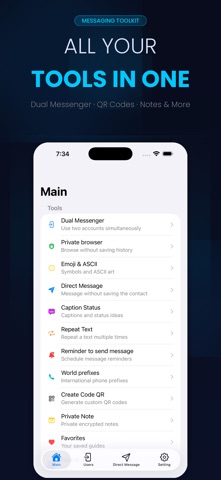
- Keep work and personal chats on separate accounts, same phone
- Use the same WhatsApp number across multiple devices
- Built-in Status Saver — download Status images and videos
- Caption & Ascii Faces creators for WhatsApp posts
- Text Repeater and Text-to-Emoji tools
- Private Browser with ad blocking, built in
- Private Notes, locked and hidden
- Message Reminder — schedule a message to send later
- Send a WhatsApp message to any number without saving the contact
- Step-by-step guides: hide your last seen, disable auto-download,
change number without losing chat history, and more
PREMIUM
Unlock every feature with a subscription (monthly, annual, or
one-time) or continue using the free tier with ads. Manage or cancel
anytime from your iTunes account: iTunes > Account > Subscriptions.
Dual Messenger is an independent utility and is not affiliated with,
endorsed by, or sponsored by WhatsApp Inc., Telegram FZ-LLC, Meta
Platforms, or any other messaging service mentioned above. All
trademarks belong to their respective owners.
Terms & Privacy: https://ecapps.info/terms-of-use-and-privacy-policy/