
iPhone Screenshots



Description
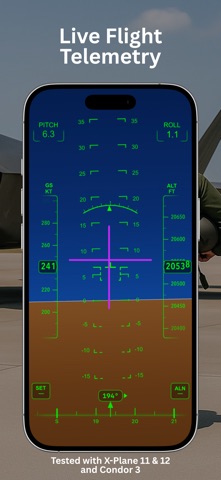
AirHorizon is a simple, responsive aviation instrument simulator built around an artificial horizon with real-time motion.
Designed for pilots, student pilots, and aviation enthusiasts, it helps you visualize pitch and roll, monitor climb and descent, explore cockpit-style HUD layouts, and better understand aircraft attitude using your device or compatible external telemetry.
Features:
- Artificial horizon in portrait and landscape modes with smooth, responsive pitch and roll movement
- Speed and altitude tapes
- Heading tape with marker
- Variometer with visual indication and audio cues for climb and descent
- Variometer operation in the background or with the screen locked when sound is enabled
- Variometer input from device sensors or a supported external data source
- Adjustable variometer units, with sensitivity and response settings for device sensor input
- Modern pitch and roll boxes
- Night Vision HUD mode
- External flight telemetry over UDP
- Director Mode indication when using a supported external data source
- Adjustable instrument layout and display tuning
- Aircraft symbol overlay
- System status indicators
- One-tap calibration for pitch and roll alignment
External telemetry and compatibility:
External telemetry was tested on iOS and iPadOS with X-Plane 11 and X-Plane 12, and on iOS with Condor 3. All simulators ran on macOS; Condor 3 ran through CrossOver.
AirHorizon is an independent app. Neither AirHorizon nor its developer is affiliated with the developers of X-Plane, Condor, or CrossOver.
X-Plane and Condor 3 are used here as setup examples. Other applications may also work if they transmit flight data over UDP in a message format supported by AirHorizon. Using UDP alone does not guarantee compatibility.
Available readings and features depend on the data provided by the external source. The guide in Settings > External Source explains network configuration, supported telemetry, and variometer setup.
Important for iPad:
Enable Orientation Lock to prevent the instrument screen from rotating while moving the device.
Disclaimer:
AirHorizon is designed for simulation and familiarization purposes. It is not a certified aviation instrument and should not be used as a primary flight reference. Use at your own risk.
Terms of Use (Apple Standard EULA): https://www.apple.com/legal/internet-services/itunes/dev/stdeula/
Terms of Service: https://valnikodeveloper.github.io/airhorizon-legal/terms-of-service.html
Privacy Policy: https://valnikodeveloper.github.io/airhorizon-legal/privacy.html