
Sticky Notes: Notepad Widget
Pin notes to screens and track tasks
Shota Yamashita
iPhone Screenshots


Description
Pin notes to Home Screen, Lock Screen, or Apple Watch for quick access. Organize tasks, reminders, and to-do lists by category. Customize backgrounds with colors, patterns, or personal photos. Choose fonts, adjust size, spacing, and color.
Sticky Notes is a notepad app you can use just like sticky notes.
Pin your memos to the Home Screen so you can see them anytime and edit with a single tap.
Now with checklists, bullet lists, numbered lists, and headings — organize shopping lists, to-do lists, tasks, and schedules all in one app.
We hope you'll give it a try.
■ App highlights
- Pin memos to your Home Screen or Lock Screen for instant access anytime
- Show a note on the Lock Screen without placing a widget
- Manage shopping and packing lists with checklists — tick items right from the widget
- Sort memos by purpose to manage to-dos for work or school
- Customize the background with colors or photos to make a notepad that's truly yours
- Choose cute fonts and freely adjust the text size
■ Organize with lists and headings
Keep shopping lists, to-do lists, and packing lists as checklists.
Checked items get a strikethrough, so you can see what's left at a glance.
- Checklists — tap to tick off, right from your Home Screen widget
- Bullet and dash lists — line up tasks and things to buy
- Numbered lists — for steps, recipes, anything where order matters
- Headings — use Title, Heading, and Subheading to break up longer notes
- Everything looks the same on iPhone, iPad, widgets, and Apple Watch
■ Powerful customization
- Background of your choice (color, pattern, or photo)
- Switch fonts (handwriting-style and cute fonts available)
- Adjust text size, line height, and letter spacing
- Change text color
- Set your own photo as the background
■ Suggested uses
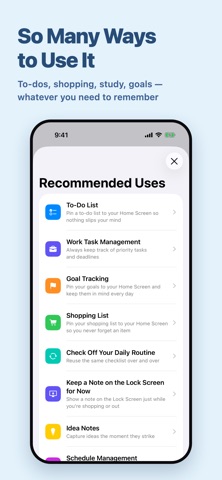
- Keep your schedule, to-dos, and tasks in plain sight on the Home Screen
- Build a shopping list as a checklist and tick items off at the store
- Pack for a trip with a checklist you tick as you go
- Lay out steps or recipes as a numbered list
- Break long notes into sections with headings
■ Handy memo features
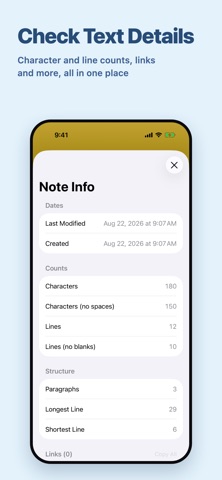
- Character count helps you gauge length for social posts or assists with writing
- Undo or redo your latest input with a single tap
- Copy the memo's contents with one tap
- Share memos to other apps or run various actions from the share sheet
■ Show a Note Large on Your Lock Screen
Notes you only need to check for a while — like a shopping list or a packing list — are handy to show on the Lock Screen. Just glance at the screen; there’s no need to unlock.
Unlike a widget, you don’t have to set aside space in advance. Show the note from the menu when you need it, and end it once you’re done.
- Switch by situation: a shopping list while you shop, a packing list while you travel
- You can show several notes at the same time
- When you edit the note, the Lock Screen updates too
- For notes you want to keep visible all the time, a Lock Screen widget is a better fit
■ Fully optimized for iPad
- The note screen is optimized for the iPad's larger display
- Full support for window resizing. Side by side with another app or scaled down, the layout adapts to the width automatically
- Works with Split View, Slide Over, Stage Manager, and windowed apps
- Use the whole screen in portrait or landscape
- Home Screen and Lock Screen widgets work on iPad too
- Keep a note open next to whatever you're reading or looking up
■ Widget types
- Memo widget
- Memo list widget
- Lock Screen-only widget
- Apple Watch widget
■ Get more with Premium
Upgrade to Premium to keep the simple feel and unlock even handier extras.
Benefit 1. All ads removed
Benefit 2. Set your own photos as memo backgrounds (use wallpapers from your favorite anime or manga, family photos, anything you love)
Benefit 3. The memo list widget becomes available
*The one-time Pro plan supports Family Sharing, so when one family member buys it, everyone in the family can use Premium features.
■ Subscription
Please review the following for subscription terms:
- Privacy Policy: https://rands-app.com/privacy-policy-en/
- Terms of Use: https://rands-app.com/terms-en/