
iPhone Screenshots

Description
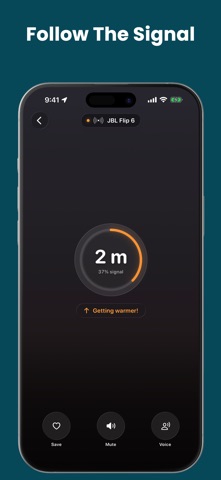
Locate devices using signal strength indicators. Navigate toward stronger signals to find items like phones, headphones, or watches. Receive proximity feedback to pinpoint devices when signal reaches 100%.
Walked out without your keys? Earbuds lost in the couch?
It answers two questions: is my stuff with me — and if not, where is it?
Works with everyday Bluetooth gear: earbuds, headphones, keys, tags, speakers, watches, trackers.
(Only Apple's Find My can ring or identify an AirTag or AirPods. Unnamed Apple gear still appears here as "Apple device".)
IT'S HERE SOMEWHERE — FIND IT
Open the app and walk around. It tells you how close you are in plain words — Far, In the room, Close, Within arm's reach — and the screen warms up as you get nearer.
- Sound and vibration that speed up as you close in, so you can look around instead of at the screen
- Tells you when you're getting warmer or colder, and if you walked past it
- See-through camera background, so the room stays in view while you hunt
- Says "Signal lost" within seconds of it going quiet, instead of pretending
- No name? It shows the brand, like "Sony device", so you know what's yours
- Rename anything and pick its icon — "Mom's keys", not "TW-3F2A"
DON'T LET ME LEAVE IT BEHIND
- Before You Go: one tap before you head out — what's with you, what's missing
- Star the things you can't lose, and get told if one stays behind when you leave
- Get a nudge when you walk away from something
- Safe Zone: a warning if you leave a trusted place without it
- A widget on your Home or Lock Screen, so a glance is enough
- With Pro, alerts keep watching while the app is closed, for gear this iPhone has heard once
IT'S ALREADY GONE
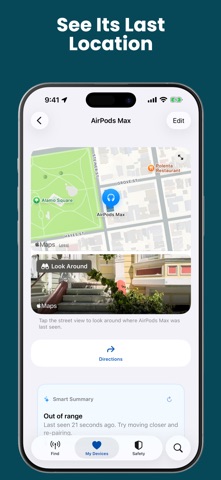
- A map of where you last had it, with walking directions
- A street-level view of the exact spot, where available
- Notify When Nearby: for gear this iPhone has met before, it tells you when it's back in range
- A 7-day trail of the places it travelled with you, built while the app is running
- A plain-English answer to "where did I leave it?"
IS MY TAG STILL WORKING?
- Tells you when a tag's battery is low, for tags that report it over Bluetooth
- Tells you if a saved tag has gone silent for days, so a dead battery never surprises you
IS SOMETHING FOLLOWING ME?
Safety Scan checks whether an unknown Bluetooth tracker is travelling with you. Free for everyone — and if you find one, hunting it down is free too, exact distance included.
- Flags a device that turns up with you at two separate places, or stays near you over eight minutes
- Found one? Tap it and hunt it down like any other device
- Keeps a record of every flag for 60 days; share any of them as text
- Recognise your own gear? Ignore it, and it stays unflagged while it keeps that Bluetooth name
- Follow the scan from your Lock Screen or Dynamic Island
HONEST BY DESIGN
If the app can't actually check something, it says so instead of guessing. You'll never get a green "all set" for a device it never heard from, and a scan that couldn't do its job says so rather than calling it all clear.
ON ALL YOUR DEVICES
iPhone, iPad and Apple Watch, kept in sync through iCloud. Find things from your wrist, with a watch complication and a Smart Stack card.
WHAT'S FREE
Live hunting with plain-words closeness, sound and vibration, the camera background, saving and renaming, Notify When Nearby, alerts while the app is open, the last-seen map with directions, battery and silent-tag warnings, the whole Safety Scan, and the widgets. Plus a one-minute try of exact distance.
EXACTTRACK PRO
- Exact distance, in feet or metres
- Voice guidance, and wrist taps that quicken as you close in
- Always-On Guard: alerts even when the app is closed
- The Before You Go check, and the automatic one when you leave home
- Safe Zones, the 7-day trail, and the plain-English summary
Monthly or yearly, with a 7-day free trial. Cancel any time.
Already bought ExactTrack? You keep the distance, voice and haptics you paid for, for life.
Privacy: https://fierce-inlet-63133.herokuapp.com/find-airpords-privacy
Terms of Use: https://www.apple.com/legal/internet-services/itunes/dev/stdeula/