
iPhone Screenshots

Description
Khigo brings fast, directional browsing to Safari.
Drag, drop, and go — open links, images, or search text instantly using simple gestures. No more copying, pasting, or switching tabs.
# How it works
Drag text, a link, or an image, then move in a direction:
- Left-Up
- Right-Up
- Right-Down
- Left-Down
Each direction can perform a different action — search, open, or customize to your workflow.
# Features
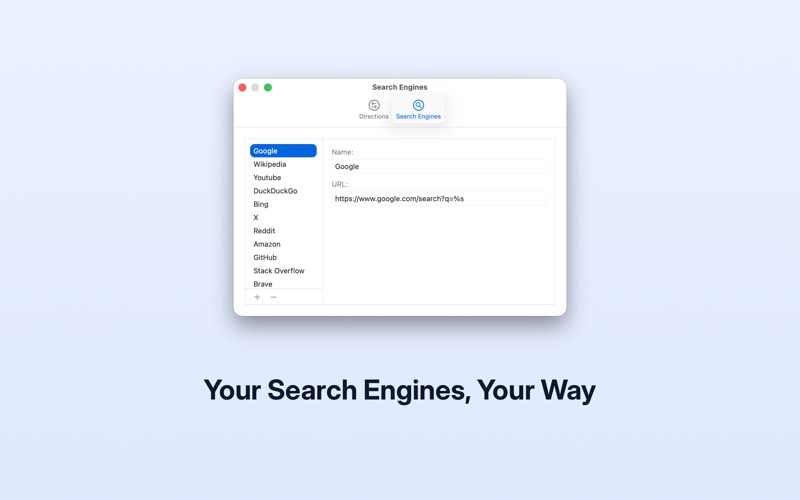
- Search selected text with different search engines using drag directions
- Open links and images in new tabs with a simple drag
- Open tabs next to the current tab, with control over placement for each direction
- Assign search engines and behaviors to each direction
- Choose whether tabs open in foreground or background
- Works directly in Safari as a lightweight web extension
# Smart behavior
Khigo adapts to your content and intent:
- When text contains URLs, choose to open links or search text
- When dragging images with links, choose what to open
- Modifier keys let you quickly switch behavior while dragging
# Designed for productivity
Khigo reduces friction in everyday browsing:
- No manual copy and paste
- No context switching between tabs
- Faster, more natural interaction with content
# Customizable workflow
Set up directions the way you work:
- Add, remove, and configure search engines
- Define behavior for each direction
- Control how and where tabs open
# Controls
- Hold ⇧ (Shift) or ⌥ (Option) to temporarily switch behavior while dragging
- Hold ⌘ (Command) to download URLs with jDM
- Press Escape to cancel a drag action
Khigo keeps your focus on content — and lets you act on it instantly.