Simple Golf GPS
Track course markers and distances
Mobile Software Design, LLC
iPhone Screenshots
Description
A GPS for golfers allows users to lock the screen by pointing at the green. Set markers to measure distances between points. Multiple markers can be placed and adjusted. Zoom in and out using pinch gestures. Demo mode is available for practice.
Try this easy to user GPS for golfers! On the golf course just point your phone at the green then press the lock button to stop screen rotation.
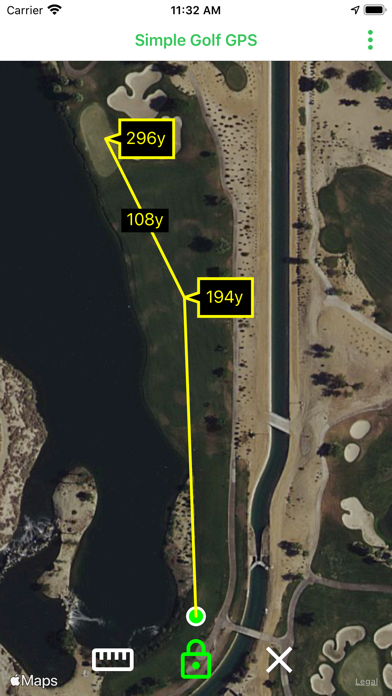
Touch anywhere to set a marker and see the distance to that point.
Supports multiple markers and displays the distance between them. Place a marker on the green then a second marker where you'd like to hit your tee shot.
Markers can be dragged to adjust their location. Pinch the map to zoom in and out.
Under the menu enable demo mode to practice using the app. Disable demo mode when using on the golf course.
Supports distances in both yards and meters.
To measure shot distance press the measure button then go to your ball.
The functionality is 100% map based, there is no course data to download. Adequate wireless signal is required in order to retrieve map imagery.